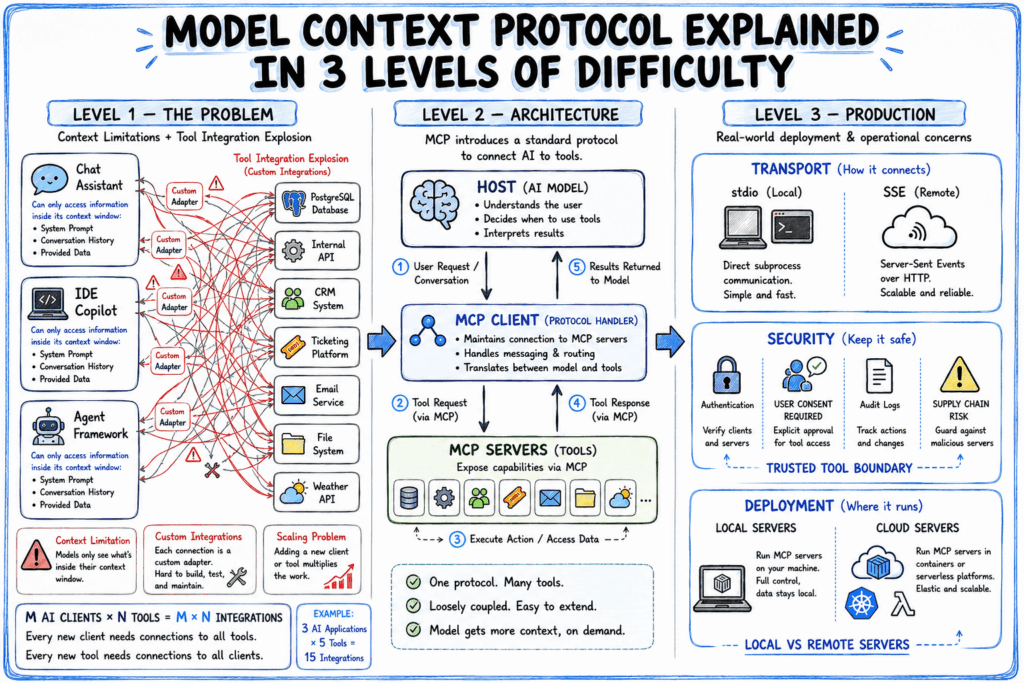
Model Context Protocol Explained in 3 Levels of Difficulty
MCP provides a standard way for AI applications and external systems to communicate.
Model Context Protocol Explained in 3 Levels of Difficulty Beitrag lesen »


MCP provides a standard way for AI applications and external systems to communicate.
Model Context Protocol Explained in 3 Levels of Difficulty Beitrag lesen »

This is today’s edition of The Download, our weekday newsletter that provides a daily dose of what’s going on in the world of technology. The inevitable weakness of metrics There are plenty of useful things a metric can reveal. There are even more that it can obscure or corrupt. Like a lot of people bitten by the self-quantifying bug, I started gathering personal data to pursue a nebulous collection of goals and desires. I wanted to feel better physically and emotionally, get outside more, and bring order to the messiness and uncertainty of my daily existence. But external metrics and data can never capture what’s truly important. Worse, they inevitably redefine your core sense of what’s important, whether you’re aware of the trap or not. Dive into the dangers of quantifying our lives with metrics. —Bryan Gardiner This story is from the next edition of our magazine, which is all about engineering. Subscribe now to get a copy when it lands! Elephant alert! AI warning systems aim to avoid deadly clashes India is home to about 60% of the world’s wild Asian elephants, and around 80% of their habitat lies outside protected areas. That brings them into close contact with people, and clashes can turn lethal: there have been some 3,000 human casualties in the last five years and over 1,000 elephant deaths since 2014. In response, state forest departments, NGOs, and locals are designing, testing, and deploying a range of AI systems that cut response and warning times to minutes—or even seconds. They range from wildlife eyes in Maharashtra to infrared drones in Chhattisgarh. Find out how they work in our interactive map. —Kanika Gupta The must-reads I’ve combed the internet to find you today’s most fun/important/scary/fascinating stories about technology. 1 The US has allowed Anthropic to release Mythos 5 to “trusted” orgsAbout 100 US companies and federal agencies now have access. (Semafor)+ The White House said appropriate safeguards were now in place. (WSJ $)+ The US had restricted both models over national security concerns. (BBC)+ Which raised new questions about AI safety. (MIT Technology Review) 2 A Chinese AI model has matched Mythos in finding security bugsSecurity researchers say Zhipu AI is poised to reset the AI race. (WSJ $)+ It’s sparked alarm that US restrictions are boosting China’s progress. (NYT $)+ Although it still can’t match Anthropic or OpenAI on general tasks. (Verge)+ In the AI race, China is eyeing a come-from-behind victory. (WP $) 3 Apple is seeking approval to buy chips from a blacklisted Chinese firmIt’s lobbying the White House for clearance to buy from ChangXin. (FT $)+ ChangXin is on a Pentagon list of firms with Chinese military ties. (WP $)+ Chipmakers are profiting off AI at the expense of everyone else. (WSJ $)+ The US is banning imports of more Chinese technology. (Reuters $)+ But Chinese tech companies feel optimistic. (MIT Technology Review) 4. South Korea plans to train its entire military as “drone warriors”It wants to train all 500,000 personnel. (Reuters $)+ And produce 110,000 drones by 2029. (Ars Technica) 5 Google has limited Meta’s use of its Gemini AI modelsMeta wanted more compute than Google could provide. (FT $)+ The cap has disrupted and delayed some Meta AI projects. (Bloomberg $) 6 Zuckerberg wants Meta to work with Polymarket and KalshiMeta wants its own prediction market, but without real-money bets. (NYT $)+ The partnerships could hedge risks and accelerate development. (Reuters $) 7 Extreme heat is putting already hot data centers under pressureSevere weather is now the leading cause of loss for data centers. (CNBC)+ Heat waves also mess with your brain. (MIT Technology Review) 8 Android phones alerted millions moments before Venezuela’s earthquakesThey gave users between seconds and up to two minutes’ notice. (NYT $) 9 Scientists think Uranus and Neptune may not be the icy giants we imaginedThey may have a magma ocean brewing on the inside. (Gizmodo) 10 Too much sleep may be as harmful as too littleA new study suggests 6.4–7.8 hours is the sweet spot. (Economist $) Quote of the day “This kind of powerful weapon that can alter the landscape of cyberwarfare can’t remain solely in American hands.” —360 Security CEO Zhou Hongyi tells a cybersecurity conference in Beijing why Chinese AI firms need to match the capabilities of their rivals in the US, The Wall Street Journal reports. One More Thing GETTY Why Generation Z falls for online misinformation Research shows that young people are more likely to believe and pass on misinformation if they feel a sense of common identity with the person who shared it in the first place. Offline, teenagers are likely to draw on the context that their communities provide. Social media, however, promotes credibility based on identity rather than community. And when trust is built on identity, authority shifts to influencers. As young people participate in more political discussions online, those who have successfully cultivated identity-based credibility could become de facto community leaders, attracting like-minded people and steering the conversation. While that has the potential to empower marginalized groups, it also exacerbates the threat of misinformation. Find out what we can all learn about how young people evaluate truth online. —Jennifer Neda John We can still have nice things A place for comfort, fun, and distraction to brighten up your day. (Got any ideas? Drop me a line.) + The Euclid space telescope has captured the most detailed image yet of the Milky Way.+ Here’s a lovely, lilting medieval bardcore cover of Daft Punk’s electronic classic Veridis Quo.+ A toilet plunger becomes an unlikely engineering breakthrough in this quest to build a better blowgun.
The Download: metric weaknesses and AI elephant warnings Beitrag lesen »

Enterprise investment in AI is booming. Gartner is calling 2026 an “inflection year” for organizations to align their AI projects with strategic business objectives. As the pressure to prove ROI mounts, executives and technology leaders are looking to agentic AI to drive the measurable financial outcomes their businesses seek. A prime opportunity for AI agents exists in the tech function, where IT infrastructure costs are projected to grow two to three times by 2030, even as budgets remain unchanged, according to McKinsey. And in the last 18 months, tech teams—the engineers, developers, architects, and other practitioners who are building, deploying, and continually improving their organizations’ infrastructure and applications—are clearly putting agents to work. DOWNLOAD THE REPORT The ultimate promise of agents is not only to automate tasks but to manage and coordinate entire workflows, pursuing business goals in a way that allows humans and agents to work together. Given the risks involved in automated decision-making, teams cannot delegate the work that agents do without confidence that they are fully capable of performing the task and that it will do so in a safe, reliable, and secure manner. Among technology experts, our research shows that teams are exceedingly confident about using agentic AI across a significant amount of AI, data, and cloud tasks. Where agent readiness drops is largely due to a lack of business context being supplied to agentic systems. The more complex the task, the more reasoning capability an agent requires and the greater its need for business context. Such context-generation capabilities for agents are still at an early stage of development, especially in situations where enterprise data is difficult to wrangle and connect into the agent lifecycle at the speed and quality in which developers and executives need it. Human oversight is a key factor of success in deploying agentic AI. Knowing that tech teams are in a pivotal position to lead this transformation, the experts we interviewed expect agent confidence to accelerate as experience with agents deepens and business environments mature. “As we design agents to operate within the same operational boundaries, identity systems, and governance models that teams already use, they start to behave more like the systems organizations already trust,” says Jeremy Winter, corporate vice president and chief product officer at Microsoft Azure Platform. This report, based on a survey of 300 global technology experts, ranks 101 tasks across AI, data, and cloud workflows based on respondents’ confidence in agents acting on their behalf. It also examines how technology teams view the opportunities and challenges related to agentic AI, along with the potential for the technology to enhance their careers. Key findings from the report include: Confidence in agents is surging for measurable tasks and growing in areas of complex judgment. Technology experts overwhelmingly believe agents help with everyday work including streamlining processes, improving performance, and reducing repetitive tasks. Confidence is highest for processes like generating reports and boilerplate code, and there is clear opportunity where tasks involve multistep workflows and advanced reasoning to make decisions. Data workflows are the breakthrough domain. Tech teams trust agents most where structure can provide a reliable foundation for decisions. This includes areas such as data quality monitoring, visualization anomaly detection, real-time data stream monitoring, and data profiling. This is where domain experts closest to the point of data generation can provide context to allow agents to act and deliver trusted outcomes. Download the full report. Read the Microsoft Cloud blog by Amanda Silver, corporate vice president of Microsoft 365 Core and Work IQ, which underscores the importance of keeping humans in the loop and how systems thinking advances careers. And for a deeper dive into data workflows as a breakthrough use case for agents, check out the Fabric blog to hear from Kim Manis, corporate vice president of Product for Microsoft Fabric. This content was produced by Insights, the custom content arm of MIT Technology Review. It was not written by MIT Technology Review’s editorial staff. It was researched, designed, and written by human writers, editors, analysts, and illustrators. This includes the writing of surveys and collection of data for surveys. AI tools that may have been used were limited to secondary production processes that passed thorough human review.
Agent confidence on the technical frontier Beitrag lesen »
This story originally appeared in The Algorithm, our weekly newsletter on AI. To get stories like this in your inbox first, sign up here. Imagine coming in to work to learn that a new underling will report to you. The worker is not a person but an AI tool—one that your company nonetheless calls Alex, an “employee” with a title and defined responsibilities. How well do you think you would work with Alex? If you’re anything like the managers recently studied by Emma Wiles, a Boston University business professor, treating Alex as a “coworker” and not a software tool would lead you to do a worse job. Wiles found that people caught 18% fewer errors when the work was said to have come from an agentic “AI employee” rather than a chatbot. It turns out that what’s in a name matters. A lot. This is an alarming glimpse of the future Silicon Valley is hurling us toward. Last year Nvidia’s CEO, Jensen Huang, talked about workplaces of “digital humans.” Since April, Microsoft, OpenAI, Anthropic, and Google have all released new tools oriented toward managing teams of AI agents, many of which are explicitly advertised as digital colleagues with the flexibility and cognitive power of actual humans. And nearly a third of the 1,261 managers who participated in Wiles’s study said their companies already frame AI agents as employees (23% even list them on org charts). The technical progress of agentic AI is not all hot air, of course. Agents, which can effectively be thought of as AI tools programmed to work in a loop until they achieve a goal, have become measurably better at more complicated tasks. But it’s a huge leap to refer to these tools as coworkers or employees, and doing so will set unrealistic expectations for what AI can do while leaving the human employees supposedly responsible for them worse off. That’s partially because, Wiles’s research suggests, it inverts our sense of who’s in charge. When an AI tool was framed as an employee, participants in the study saw themselves as less responsible for its output. They were also 44% more likely to escalate its questionable work to a manager for further review rather than trusting their own corrections (thus negating the time-saving purpose of using the AI agent in the first place). That matters far beyond office culture: As AI agents are embedded into health care, warfare, education, and government, there’s a growing risk they’ll become a convenient place to dump blame for failures that are instead the product of bad human decisions, incentives, and oversight (recall how the bomb strike on a girls’ school in Iran was popularly blamed on Claude, when all signs point to a cascade of human errors). “AI agents right now are being marketed as things that can replace humans, and I think that’s just a losing proposition,” says Daron Acemoglu, an economist at MIT who won the Nobel Prize in 2024 and studies AI’s impact on the economy. “They should instead be optimized so that they can improve human capabilities, which is not what they have [been] at the moment.” What could that look like? Consider a new effort at Stanford, where researchers presented 1,500 workers in 104 jobs with information about what tasks AI could potentially do in their work and then asked what would actually be most helpful and productive. Workers did want automation in certain areas: Law clerks thought AI could help ensure that adequate progress was being made across cases, for example. But often the tasks that tech experts deemed most suitable for AI—like verifying customer credit ratings for sales reps—were what the actual workers said they definitely did not want or need an agent to do. Which brings us back to Alex. Calling Alex an employee is easy—and convenient, especially when something goes wrong—but it’s a branding exercise. It doesn’t make the tool more fit for the job, and as Wiles’s research shows, it makes the humans around it worse at theirs. And recall that they are the ones with the agency that AI is trying to replicate. They deserve better than Alex.
AI agents are not your “coworkers” Beitrag lesen »
In this tutorial, we build an advanced, self-contained OCRmyPDF workflow. We start by installing the required system and Python dependencies, then create a synthetic image-only PDF for scanning so we can test OCR without relying on external files. From there, we use OCRmyPDF’s real public API to convert scanned documents into searchable PDFs, generate PDF/A outputs, extract sidecar text, validate the results, compare file sizes, tune Tesseract settings, clean noisy scans, handle already-OCRed files, process images with DPI hints, run OCR in memory, and batch-process multiple PDFs. Through this workflow, we understand how OCRmyPDF can serve as a practical document digitization pipeline for archival, search, extraction, and automated processing tasks. Installing OCRmyPDF System Dependencies Copy CodeCopiedUse a different Browser import io import os import re import sys import time import shutil import logging import textwrap import subprocess from pathlib import Path INSTALL_JBIG2 = True def sh(cmd: str, check: bool = True) -> int: “””Run a shell command, echo it, and show the tail of its output.””” print(f” $ {cmd}”) r = subprocess.run(cmd, shell=True, text=True, stdout=subprocess.PIPE, stderr=subprocess.STDOUT) if r.stdout and r.stdout.strip(): for ln in r.stdout.strip().splitlines()[-12:]: print(” ” + ln) if check and r.returncode != 0: raise RuntimeError(f”Command failed ({r.returncode}): {cmd}”) return r.returncode def install_dependencies() -> None: “””Install OCRmyPDF’s system + Python dependencies for Colab/Ubuntu.””” apt_pkgs = ( “tesseract-ocr tesseract-ocr-eng tesseract-ocr-osd ” “tesseract-ocr-deu tesseract-ocr-fra ” “ghostscript unpaper pngquant poppler-utils qpdf” ) sh(“apt-get update -qq”, check=False) sh(f”DEBIAN_FRONTEND=noninteractive apt-get install -y -qq {apt_pkgs}”) sh(f'”{sys.executable}” -m pip install -q –upgrade ocrmypdf img2pdf “pillow<12″‘) if INSTALL_JBIG2 and shutil.which(“jbig2”) is None: try: build_pkgs = (“autoconf automake libtool pkg-config ” “libleptonica-dev zlib1g-dev build-essential git”) sh(f”DEBIAN_FRONTEND=noninteractive apt-get install -y -qq {build_pkgs}”) sh(“rm -rf /tmp/jbig2enc && ” “git clone -q https://github.com/agl/jbig2enc.git /tmp/jbig2enc”) sh(“cd /tmp/jbig2enc && ./autogen.sh >/dev/null 2>&1 && ” “./configure >/dev/null 2>&1 && make -j2 >/dev/null 2>&1 && ” “make install >/dev/null 2>&1 && ldconfig”) print(” jbig2enc:”, “installed” if shutil.which(“jbig2”) else “built, but binary not on PATH”) except Exception as e: print(” jbig2enc build skipped (optional):”, e) def ensure_installed() -> None: have_tools = bool(shutil.which(“tesseract”) and shutil.which(“gs”)) try: import ocrmypdf import img2pdf from PIL import Image have_py = True except Exception: have_py = False if have_tools and have_py: print(“Dependencies already present — skipping installation.”) else: print(“Installing dependencies (first run can take a few minutes)…”) install_dependencies() ensure_installed() We set up the complete OCRmyPDF environment for Google Colab by importing the required standard libraries and defining the installation workflow. We install system tools such as Tesseract, Ghostscript, unpaper, pngquant, poppler, and qpdf, along with Python packages like OCRmyPDF, img2pdf, and Pillow. We also optionally build jbig2enc so that advanced PDF optimization can produce smaller outputs for scanned documents. Loading OCRmyPDF and Building Synthetic Scans Copy CodeCopiedUse a different Browser def _purge(*prefixes): for name in [m for m in list(sys.modules) if any(m == p or m.startswith(p + “.”) for p in prefixes)]: del sys.modules[name] def _load_ocrmypdf(): _purge(“PIL”, “ocrmypdf”) import ocrmypdf return ocrmypdf try: ocrmypdf = _load_ocrmypdf() except ImportError as e: if “_Ink” in str(e) or “PIL” in str(e): print(“Repairing an incompatible Pillow (reinstalling pillow<12)…”) sh(f'”{sys.executable}” -m pip install -q –force-reinstall “pillow<12″‘) try: ocrmypdf = _load_ocrmypdf() print(“Pillow repaired — continuing without a restart.”) except Exception: raise RuntimeError( “Pillow is still incompatible in this session. Use the Colab menu: ” “Runtime > Restart session, then run this cell again.” ) else: raise from ocrmypdf.exceptions import ( ExitCode, PriorOcrFoundError, EncryptedPdfError, MissingDependencyError, TaggedPDFError, DigitalSignatureError, DpiError, InputFileError, UnsupportedImageFormatError, ) from ocrmypdf.helpers import check_pdf from ocrmypdf.pdfa import file_claims_pdfa import img2pdf from PIL import Image, ImageDraw, ImageFont, ImageFilter logging.basicConfig(level=logging.WARNING, format=”%(levelname)s: %(message)s”) logging.getLogger(“ocrmypdf”).setLevel(logging.WARNING) logging.getLogger(“pdfminer”).setLevel(logging.ERROR) logging.getLogger(“PIL”).setLevel(logging.WARNING) SAMPLE_TEXT_PAGES = [ “Optical Character Recognition, commonly abbreviated as OCR, is the ” “process of converting images of typed or printed text into machine ” “encoded text. This page was generated as a synthetic scan so that the ” “OCRmyPDF pipeline has something realistic to recognize and search.”, “On 14 March 2026 the archive contained 1,482 pages across 37 folders. ” “Roughly 92 percent of those pages were scanned at 200 to 300 dots per ” “inch. The remaining 8 percent were skewed and required deskewing before ” “any reliable recognition was possible.”, “After OCRmyPDF finishes, the output is a searchable PDF/A file. You can ” “select text, copy it, and run full text search across thousands of ” “documents. The original image resolution is preserved while a hidden ” “text layer is placed accurately underneath the page image.”, ] def _find_font(): for cand in ( “/usr/share/fonts/truetype/dejavu/DejaVuSans.ttf”, “/usr/share/fonts/truetype/liberation/LiberationSans-Regular.ttf”, ): if os.path.exists(cand): return cand return None _FONT_PATH = _find_font() FONT = ImageFont.truetype(_FONT_PATH, 40) if _FONT_PATH else ImageFont.load_default() def _add_speckle(img, n=6000, dark=60): “””Sprinkle light dark specks to imitate scanner noise (motivates –clean).””” import random px = img.load() w, h = img.size for _ in range(n): px[random.randint(0, w – 1), random.randint(0, h – 1)] = random.randint(0, dark) return img def render_page(text, skew=False): “””Render one A4 page (1654×2339 px ≈ 200 DPI) of dark text on white.””” W, H = 1654, 2339 img = Image.new(“L”, (W, H), 255) draw = ImageDraw.Draw(img) draw.multiline_text((150, 180), textwrap.fill(text, width=58), fill=25, font=FONT, spacing=18) if skew: img = img.rotate(6, resample=Image.BICUBIC, expand=False, fillcolor=255) img = img.filter(ImageFilter.GaussianBlur(0.6)) img = _add_speckle(img) return img def build_scanned_pdf(pdf_path: Path, pages_text, skew_index=1): “””Render pages to PNGs and wrap them losslessly into an image-only PDF.””” pngs = [] for i, text in enumerate(pages_text): img = render_page(text, skew=(i == skew_index)) p = pdf_path.parent / f”_pg_{pdf_path.stem}_{i}.png” img.save(p, format=”PNG”, dpi=(200, 200)) pngs.append(str(p)) with open(pdf_path, “wb”) as f: f.write(img2pdf.convert(pngs)) for p in pngs: os.remove(p) return pdf_path def do_ocr(input_file, output_file, **kw): “””Wrapper around ocrmypdf.ocr() that disables the progress bar and times it.””” kw.setdefault(“progress_bar”, False) t0 = time.perf_counter() rc = ocrmypdf.ocr(input_file, output_file, **kw) return rc, time.perf_counter() – t0 def tokens(s: str): return re.findall(r”[a-z0-9]+”, s.lower()) def kb(path) -> str: return f”{Path(path).stat().st_size / 1024:,.1f} KB” def banner(title: str): line = “─” * 74 print(f”n{line}n {title}n{line}”) We safely load OCRmyPDF and repair Pillow compatibility issues if they appear in the Colab runtime. We import OCRmyPDF exceptions, PDF validation helpers, img2pdf, and Pillow utilities used throughout the tutorial. We also define the sample document text and helper functions for rendering synthetic scanned pages,
Liquid AI shipped LFM2.5-230M, it’s the company’s smallest model to date. The release targets a specific job: running agentic tasks on phones, robots, and automation devices. Both the base and instruction-tuned checkpoints are open-weight on Hugging Face. The pitch is narrow on purpose. This is not a general reasoning model. It is built for data extraction and tool use on edge hardware. TL;DR Liquid AI’s LFM2.5-230M is its smallest model yet: 230M params, open-weight, built on LFM2. Runs on-device at 213 tok/s on a Galaxy S25 Ultra and 42 on a Raspberry Pi 5. Beats larger models (Qwen3.5-0.8B, Gemma 3 1B) on instruction following and data extraction. Tuned for tool use and extraction; not for math, code generation, or creative writing. Day-one support across llama.cpp, MLX, vLLM, SGLang, and ONNX, with a 293–375 MB footprint. What is LFM2.5-230M? LFM2.5-230M is a 230-million-parameter, text-only model. It is built on the LFM2 architecture. The model has 14 layers total. Eight are double-gated LIV convolution blocks. The remaining six are grouped-query attention (GQA) blocks. The hybrid layout targets fast CPU inference. The context length is 32,768 tokens. The vocabulary size is 65,536. The knowledge cutoff is mid-2024. It supports ten languages, including English, Chinese, Arabic, and Japanese. Liquid AI team ships two checkpoints. LFM2.5-230M-Base is the pre-trained model for fine-tuning. LFM2.5-230M is the general-purpose instruction-tuned version. The license is lfm1.0. Training and Post-Training The model was pre-trained on 19 trillion tokens. That total includes a 32K context extension phase. The post-training recipe then runs in three stages. First comes supervised fine-tuning with distillation from the larger LFM2.5-350M. Second is direct preference optimization (DPO). Third is multi-domain reinforcement learning. This preserves flexibility for downstream specialization. The distillation step is what keeps a 230M model competitive with larger checkpoints. It inherits behavior from the bigger LFM2.5-350M on targeted tasks. Benchmark Liquid AI team evaluated LFM2.5-230M across ten benchmarks. They span knowledge, instruction following, data extraction, and tool use. The instruction-following results support that. On IFEval, LFM2.5-230M scores 71.71. That beats Qwen3.5-0.8B (59.94) and Gemma 3 1B IT (63.49). On IFBench it scores 38.40, ahead of both. On CaseReportBench, a clinical data-extraction test, it scores 22.51. Model Params IFEval IFBench CaseReportBench BFCLv4 MMLU-Pro LFM2.5-230M 230M 71.71 38.40 22.51 21.03 20.25 LFM2.5-350M 350M 76.96 40.69 32.45 21.86 20.01 Granite 4.0-H-350M 350M 61.27 17.22 12.44 13.28 13.14 Qwen3.5-0.8B (Instruct) 800M 59.94 22.87 13.83 18.70 37.42 Gemma 3 1B IT 1B 63.49 20.33 2.28 7.17 14.04 LFM2.5-230M leads on instruction following and data extraction. It trails on broad knowledge: MMLU-Pro is 20.25, behind Qwen3.5-0.8B’s 37.42. It is also weak on some agentic tool use. On τ²-Bench Telecom it scores just 5.26. Liquid AI is direct about the limits. It does not recommend the model for reasoning-heavy workloads. That means advanced math, code generation, and creative writing. Use Cases With Examples The model fits two jobs well. The first is large-scale data extraction pipelines. Picture a pipeline parsing 100,000 clinical reports into structured fields. A 4-bit build with a 293–375 MB memory footprint runs that on commodity CPUs. You extract locally, with no per-token API bill. The second job is lightweight on-device agentic workloads. Think a home automation hub that turns speech into tool calls. Or a phone assistant that routes a request to the right function. As an early signal, Liquid AI deployed the model on a Unitree G1 humanoid robot. It ran entirely on the robot’s onboard NVIDIA Jetson Orin. There the model acted as a skill-selection layer. It turned one natural-language instruction into a sequence of tool calls. Those calls invoked low-level skills from NVIDIA’s SONIC framework. Tool Use: How It Works LFM2.5 supports function calling in four steps. You define tools as JSON in the system prompt. The model writes a Pythonic function call between special tokens. You execute the call and return the result. The model then writes a plain-text answer. By default the call is a Python list. It sits between the <|tool_call_start|> and <|tool_call_end|> tokens. Here is the documented pattern, with the tool JSON abbreviated: Copy CodeCopiedUse a different Browser <|im_start|>system List of tools: [{“name”: “get_candidate_status”, “parameters”: {“candidate_id”: {“type”: “string”}}}]<|im_end|> <|im_start|>user What is the current status of candidate ID 12345?<|im_end|> <|im_start|>assistant <|tool_call_start|>[get_candidate_status(candidate_id=”12345″)]<|tool_call_end|>Checking the current status of candidate ID 12345.<|im_end|> You can also force JSON-formatted calls through the system prompt. Running It: A Minimal Example The model works with Transformers 5.0.0 and up. The recommended generation settings are temperature 0.1, top_k 50, and repetition_penalty 1.05. Note the do_sample=True flag, which is required for those sampling settings to apply. Copy CodeCopiedUse a different Browser from transformers import AutoModelForCausalLM, AutoTokenizer model_id = “LiquidAI/LFM2.5-230M” model = AutoModelForCausalLM.from_pretrained( model_id, device_map=”auto”, dtype=”bfloat16″, ) tokenizer = AutoTokenizer.from_pretrained(model_id) inputs = tokenizer.apply_chat_template( [{“role”: “user”, “content”: “What is C. elegans?”}], add_generation_prompt=True, tokenize=True, return_dict=True, return_tensors=”pt”, ).to(model.device) output = model.generate( **inputs, do_sample=True, temperature=0.1, top_k=50, repetition_penalty=1.05, max_new_tokens=512, ) print(tokenizer.decode(output[0][inputs[“input_ids”].shape[-1]:], skip_special_tokens=True)) Liquid AI also publishes fine-tuning recipes. They cover SFT, DPO, and GRPO with LoRA, via Unsloth and TRL. Each ships as a Colab notebook. Interactive Explainer Check out the Model weight on HF, Technical details and Docs. Also, feel free to follow us on Twitter and don’t forget to join our 150k+ML SubReddit and Subscribe to our Newsletter. Wait! are you on telegram? now you can join us on telegram as well. Need to partner with us for promoting your GitHub Repo OR Hugging Face Page OR Product Release OR Webinar etc.? Connect with us The post Liquid AI Ships LFM2.5-230M with llama.cpp, MLX, vLLM, SGLang, and ONNX Support for On-Device Inference appeared first on MarkTechPost.
OpenAI has begun a limited preview of GPT-5.6, its next-generation model series. The lineup splits into three named tiers: Sol, Terra, and Luna. Sol is the flagship. Terra targets everyday production work. Luna is the fast, low-cost option. OpenAI is starting with a small group of trusted partners through the API and Codex. According to OpenAI post, they shared the models and plans with the U.S. government first. Broader access in ChatGPT, Codex, and the API is planned in the coming weeks. The change is mostly structural. GPT-5.6 introduces tiered models, two new reasoning modes, and a heavier safety stack. What is GPT-5.6? GPT-5.6 is a family, not a single model. OpenAI also changed how it names releases. The number now marks the generation. The names mark durable capability tiers. Each tier can advance on its own schedule. That gives developers a clearer choice across intelligence, speed, and cost. OpenAI calls Sol its strongest model yet. It cites gains in coding, biology, and cybersecurity. Terra matches GPT-5.5 performance while costing roughly half as much. Luna brings strong capability at OpenAI’s lowest price. New Reasoning Modes: max and ultra GPT-5.6 adds two reasoning controls. The first is a new max reasoning effort. It gives Sol the most time to reason deeply. The second is ultra mode. Instead of one model working alone, ultra leverages subagents. These subagents split complex work to accelerate it. Think of it this way. The max setting deepens a single chain of reasoning. The ultra mode coordinates several workers on one task. Both trade latency and cost for accuracy on long-horizon problems. Interactive Explainer Benchmark OpenAI shared a preview set of evaluations. Sol sets a new state of the art on Terminal-Bench 2.1. The benchmark tests command-line workflows that need planning, iteration, and tool coordination. Model / mode Terminal-Bench 2.1 GPT-5.6 Sol (ultra) 91.91% GPT-5.6 Sol (max) 88.76% Claude Mythos 5 88% GPT-5.5 83.4% source: venturebeat On Agent’s Last Exam, Sol was the only model past the halfway mark. It reached 50.9% in ‘code mode,’. On GeneBench v1, Sol beat GPT-5.5 on long-horizon genomics analysis. It did so while using fewer tokens. On ExploitBench, OpenAI reports Sol was competitive with Mythos Preview using about one-third of the output tokens. Pricing and Access GPT-5.6 is priced per one million tokens. Caching behavior also changes. Model Input / 1M Output / 1M Best for Sol $5 $30 Long-horizon coding, security, agents Terra $2.50 $15 High-volume production work Luna $1 $6 Fast, routine, low-cost tasks Sol’s $5/$30 matches GPT-5.5’s pricing. Terra is about 2x cheaper than GPT-5.5. Prompt caching now supports explicit cache breakpoints and a 30-minute minimum cache life. Cache writes cost 1.25x the uncached input rate. Cache reads keep the 90% discount. OpenAI also plans to run Sol on Cerebras hardware. It targets up to 750 tokens per second in July. Use Cases With Examples Long-horizon coding agents: Sol’s Terminal-Bench gains suit multi-step CLI automation. Example: an agent that plans, edits files, runs tests, then iterates. High-volume production: Terra fits chat features and document processing at scale. Example: summarizing thousands of support tickets each day at lower cost. Latency-sensitive apps: Luna suits autocomplete, routing, and simple extraction. Example: classifying inbound emails before a heavier model handles edge cases. Defensive security work: Sol targets vulnerability research and patching. Example: reviewing a codebase to find and fix a memory bug. Strengths and Open Questions Strengths Clear tiering across cost, speed, and intelligence New ultra subagent mode for complex, parallel work Reported state-of-the-art on Terminal-Bench 2.1 Token-efficiency gains on biology and cyber benchmarks A documented, layered safety stack Open questions Access is limited to about 20 partners at preview Public benchmark detail is partial until general availability Safeguards may block some legitimate dual-use security work Pricing sits above some open-weight competitors like GLM-5.2 Real-world latency for max and ultra is not yet public Check out the Technical details. Also, feel free to follow us on Twitter and don’t forget to join our 150k+ML SubReddit and Subscribe to our Newsletter. Wait! are you on telegram? now you can join us on telegram as well. Need to partner with us for promoting your GitHub Repo OR Hugging Face Page OR Product Release OR Webinar etc.? Connect with us The post OpenAI Previews GPT-5.6 With Sol, Terra, and Luna: Tiered Models, New Reasoning Modes, Limited Access appeared first on MarkTechPost.
DeepSeek released DSpark, a speculative decoding framework, with open-source checkpoints and training code. It is a serving optimization, not a new model. The checkpoints DeepSeek-V4-Pro-DSpark and DeepSeek-V4-Flash-DSpark reuse the existing V4 weights, with a draft module attached. The DeepSeek research team also open-sourced DeepSpec, an MIT-licensed codebase for training and evaluating speculative decoding drafters. The work targets one problem: faster large-model inference in busy production serving. TL;DR DSpark pairs a parallel draft backbone with a tiny sequential head to cut suffix decay. A confidence head and load-aware scheduler verify more tokens when GPUs are idle, fewer when busy. Offline, accepted length rises 26–31% over Eagle3 and 16–18% over DFlash. In production on DeepSeek-V4, per-user generation runs 60–85% faster than the MTP-1 baseline. Output stays lossless, and the checkpoints plus DeepSpec training code are open-source. What is DSpark? Speculative decoding splits generation into two roles. A small draft model proposes a block of tokens. The full target model then verifies that block in one forward pass. Rejection sampling accepts the longest valid prefix and appends one bonus token. Because the rule preserves the target distribution exactly, there is no quality loss. DSpark keeps this guarantee. It changes how tokens are drafted and how many get verified. The Latency Math it Optimizes Per-token latency follows one equation from the paper: L = (Tdraft + Tverify) / τ. Here τ is the number of tokens accepted per cycle. Speedup comes from three levers only. You can draft faster, lowering Tdraft. You can draft better, raising τ. Or you can verify smarter, reducing wasted Tverify. DSpark pulls all three levers at once. How It Works: Semi-Autoregressive Generation Earlier drafters force a trade-off. Autoregressive drafters like Eagle3 condition each token on prior ones. That gives strong acceptance, but drafting cost grows with block size. Parallel drafters like DFlash produce the whole block in one pass. Drafting stays cheap, but each position ignores its neighbors. The result is ‘multi-modal collision’ and rapid acceptance decay along the suffix. DSpark splits drafting into two stages. A heavy parallel backbone, DFlash in their setup, produces base logits for every position. Then a lightweight sequential head adds a prefix-dependent bias before sampling each token. The default sequential head is a Markov head. It only looks at the immediately preceding token. A low-rank factorization (rank 256) keeps it cheap, even with large vocabularies. Once position one samples ‘of’, the head boosts ‘course’ and suppresses ‘problem’. An optional RNN head tracks the full block prefix. It adds only marginal gains, so the Markov head ships as the default. The payoff shows up position by position. DSpark inherits the parallel backbone’s high first-token accuracy. The sequential head then holds acceptance steady deep into the block. Training freezes the target model and reuses its embedding and output head. A total-variation loss is the key term. Minimizing that distance directly maximizes the draft’s acceptance rate. How It Works: Confidence-Scheduled Verification More draft tokens do not always mean more speed. Verifying tokens that will be rejected wastes batch capacity under heavy load. DSpark adds two parts to fix this. A confidence head outputs a score for each draft position. The score estimates the chance that token survives verification, given accepted predecessors. It is supervised by the analytical per-step acceptance rate. Raw neural confidence is usually overconfident. So the research team applies Sequential Temperature Scaling, a post-hoc calibration step. It cuts expected calibration error from 3–8% down to about 1%. A hardware-aware prefix scheduler then sets the verification length per request. It uses a profiled throughput curve, SPS(B), measured once at startup. When GPUs are idle, it verifies more tokens. When GPUs are busy, it verifies fewer. The scheduler uses an early-stopping rule to stay lossless. The appendix section gives a counterexample showing why a naive global search would leak information. Metrics Offline tests cover math, code, and daily chat. Targets include Qwen3-4B, 8B, 14B, and Gemma4-12B. DSpark beats both baselines on accepted length across every domain. Against Eagle3, macro-average accepted length rises 30.9%, 26.7%, and 30.0% on the three Qwen3 sizes. Against DFlash, gains are 16.3%, 18.4%, and 18.3%. A 2-layer DSpark even beats a 5-layer DFlash. The sequential head adds little cost. Scaling draft length from 4 to 16 adds only 0.2–1.3% per-round latency. In return, accepted length improves by up to 30%. Production results come from DeepSeek-V4-Flash and V4-Pro under live traffic. The baseline is MTP-1, the prior single-token setup. At matched throughput, per-user speed rises 60–85% on Flash and 57–78% on Pro. The shipped configuration is DSpark-5, a five-token draft block with the Markov head. Drafter Drafting style Block cost Suffix acceptance Verification length Eagle3 Autoregressive Grows with block size High, stable Fixed DFlash Parallel Near-constant Decays fast Fixed (full block) MTP-1 Single-token (MTP) Low — Static 2 tokens DSpark Parallel + sequential head Near-constant High, stable Dynamic, load-aware Use Cases With Examples Structured workloads gain the most from longer verification. In code generation, acceptance is naturally high. The scheduler can verify long prefixes with little waste, so coding agents stream output faster. Open-ended chat behaves differently. A confidence-threshold sweep raised chat acceptance from 45.7% to 95.7%. The confidence head flags uncertain suffix tokens so they can be pruned. Math reasoning sits between the two. Its acceptance rose from 76.9% to 92.5% in the same sweep. Long step-by-step traces benefit from steady deep-block acceptance. High-concurrency serving is the headline case. At moderate load, the scheduler runs roughly 4–6 verified tokens per request. As concurrency rises, it trims that budget to protect throughput. Try It DeepSpec runs in three stages: data preparation, training, then evaluation. A config selects the algorithm and target model. Evaluation benchmarks a trained draft checkpoint across nine datasets. Copy CodeCopiedUse a different Browser # Install dependencies python -m pip install -r requirements.txt # Train a DSpark draft against a Qwen3-4B target. # The algorithm and target are chosen by the config, e.g. # config/dspark/dspark_qwen3_4b.py bash scripts/train/train.sh # Evaluate the trained draft across the 9 benchmark datasets. # Set in
Apple research team recently released the container project. It is an open-source command-line tool written in Swift. It creates and runs Linux containers as lightweight virtual machines on a Mac. The project ships under the Apache 2.0 license and targets Apple silicon. Containers are how you ship reproducible environments from a laptop to a datacenter. Apple now offers a native path that avoids a single always-on Linux VM. What is Apple’s container ? container is a CLI tool that can be used to build images, run containers, and move images to and from registries. It consumes and produces OCI-compatible container images. So you can pull from Docker Hub or GitHub Container Registry and run those images. You can also push images you build to any standard registry. container uses the open-source Containerization Swift package. That package handles low-level container, image, and process management. The tool requires a Mac with Apple silicon. Intel Macs are not supported. Apple supports container on macOS 26, which adds virtualization and networking enhancements. You can run it on macOS 15, but with networking limitations. How container Runs Your Containers Most macOS container tools run one shared Linux VM that hosts every container. Apple takes a different path. container runs a separate lightweight VM for each container you create. Apple describes three properties of this design: Security: Each container has the isolation of a full VM. A minimal set of core utilities and dynamic libraries reduces resource use and attack surface. Privacy: You mount only the data each VM needs, instead of sharing everything. Performance: These containers use less memory than full VMs. Boot times are comparable to containers in a shared VM. The runtime integrates several macOS frameworks. It uses the Virtualization framework for the VMs, and the vmnet framework for networking. It uses XPC for interprocess communication, launchd for service management, and Keychain services for registry credentials. The control plane has a few moving parts. container system start launches container-apiserver, a launch agent. The apiserver then starts an XPC helper container-core-images for image management and the local content store. It also starts container-network-vmnet for the virtual network. For each container, it launches container-runtime-linux, the per-container management helper. Interactive Explainer Use Cases With Examples Local backend development. Run a service in its own isolated VM, then forward a port to your loopback address. Copy CodeCopiedUse a different Browser container run -d –rm -p 127.0.0.1:8080:8000 node:latest npx http-server -a :: -p 8000 curl http://127.0.0.1:8080 Reproducible CI-style builds. container build starts a builder utility container that uses BuildKit. You can size the builder VM for heavy builds. Copy CodeCopiedUse a different Browser container builder start –cpus 8 –memory 32g container build –tag web-test:latest –file Dockerfile Cross-architecture images for datacenter deployment. Build one image for both Apple silicon and x86-64 servers. The amd64 variant runs under Rosetta translation. Copy CodeCopiedUse a different Browser container build –arch arm64 –arch amd64 –tag registry.example.com/fido/web-test:latest Mounting datasets for analysis. Share a host folder into the container with –volume. This is useful for feeding local data into a containerized job. Copy CodeCopiedUse a different Browser container run –volume ${HOME}/Desktop/assets:/content/assets docker.io/python:alpine ls -l /content/assets Isolating untrusted or generated code. Each container runs in its own VM, not a shared kernel. That boundary suits running code from an agent or an unknown image with less host exposure. Hands-On: Core Commands Default container resources are 1 GiB of RAM and 4 CPUs. You override them per run. Copy CodeCopiedUse a different Browser container run –rm –cpus 8 –memory 32g big Inspect live resource usage, similar to top for processes. Copy CodeCopiedUse a different Browser container stats –no-stream my-web-server Read virtual machine boot and init logs when debugging startup. Copy CodeCopiedUse a different Browser container logs –boot my-web-server On macOS 26, you can create isolated networks. Containers on different networks cannot reach each other. Copy CodeCopiedUse a different Browser container network create foo –subnet 192.168.100.0/24 container run -d –name web –network foo –rm web-test By default, containers start with a restricted set of Linux capabilities. You tune them explicitly. Copy CodeCopiedUse a different Browser container run –cap-drop ALL –cap-add SETUID –cap-add SETGID alpine id Version 1.0.0 also adds container machines. These are persistent Linux environments built from OCI images. Your home directory is mounted in, and the login user matches your Mac account. The filesystem survives stop and start. Any image containing /sbin/init qualifies as a container machine. Two other 1.0.0 changes affect upgraders. System settings moved to a TOML file at ~/.config/container/config.toml. The container system property get and set subcommands were removed. The tool also added structured JSON, YAML, and TOML output for list and inspect, easing automation. Apple container vs Docker Desktop Property Apple container Docker Desktop Isolation model One lightweight VM per container Shared Linux VM, shared kernel Idle footprint Near-zero when nothing runs Always-on background VM Image format OCI-compatible OCI-compatible Build engine BuildKit via builder VM BuildKit License Apache 2.0 Commercial terms for larger orgs Hardware Apple silicon only Apple silicon and Intel Compose / GUI Not built in Yes Best fit Single-container runs, native isolation Compose workflows, mature ecosystem Strengths and Limitations Strengths: Per-container VM isolation reduces shared attack surface versus a shared kernel. Idle memory cost is low, since stopped containers free their footprint. OCI compatibility means your images run elsewhere without conversion. The Apache 2.0 license carries no feature paywall. Limitations: The macOS Virtualization framework supports only partial memory ballooning. Pages freed inside a container are not always relinquished to the host. Heavy workloads may need occasional restarts to reduce memory use. There is no built-in Docker Compose. macOS 15 users face networking restrictions, and Intel Macs are unsupported. Check out the Repo here. Also, feel free to follow us on Twitter and don’t forget to join our 150k+ML SubReddit and Subscribe to our Newsletter. Wait! are you on telegram? now you can join us on telegram as well. Need to partner with us for promoting your GitHub Repo OR Hugging Face Page OR Product Release OR Webinar etc.? Connect with us The post Meet container: Apple’s Open-Source Swift
arXiv:2606.26511v1 Announce Type: new Abstract: Retrieval-augmented generation (RAG) gives agents access to accumulated knowledge, but has no model of time. When a fact changes (e.g., a function is renamed or API restructured), RAG retrieves both the stale and current value with near-identical embedding similarity. The agent then either abstains or serves the superseded fact. We show this is a structural problem: on a calibrated dataset, cosine similarity distinguishes a contradicted fact from a duplicated one with AUROC 0.59 (near chance), as contradictions are often more embedding-similar to the original than rephrased duplicates. We present MemStrata, a retrieval memory maintaining temporal validity. It stores facts like RAG, preserving static recall, but when a fact’s value is contradicted, a deterministic (subject, relation, object) supersession rule retires the stale value in a bi-temporal ledger – with no similarity threshold and no LLM call. Across six benchmarks run locally with a 7B model, MemStrata ties RAG on static knowledge and reaches 0.95-1.00 accuracy on evolving knowledge (where RAG reaches 0.20-0.47). The central result is the stale-fact-error rate: when required to answer, RAG serves superseded values 15-40% of the time; MemStrata drives this to ~0%, a failure class RAG cannot avoid. MemStrata achieves this at retrieval latency (~2.1s) versus ~16-18s for LLM-reranking baselines. We release the harness, datasets, and a marker-free evaluation protocol for memory under knowledge evolution.
We use cookies to improve your experience and performance on our website. You can learn more at Datenschutzrichtlinie and manage your privacy settings by clicking Settings.


