YouZum

Committee

AI, Committee, Actualités, Uncategorized

A Comparison of Traditional Machine Learning Algorithms and LSTM-Based Deep Learning Models for Email Sentiment Analysis

arXiv:2605.03440v1 Announce Type: new Abstract: The rapid growth of electronic communication has necessitated more robust systems for email classification and sentiment detection. This study presents a comparative performance analysis between traditional machine learning algorithms and deep learning architectures, specifically focusing on Support Vector Machines (SVMs), Logistic Regression, Naive Bayes, and Long Short-Term Memory (LSTM). Utilizing Word2Vec embeddings for feature representation, our experimental results indicate that the SVM model with a linear kernel achieves the highest efficiency and accuracy, reaching a peak performance of 98.74%. While the LSTM model demonstrates exceptional recall capabilities in detecting spam-related sentiments, it requires significantly more computational time compared to discriminative statistical models. Detailed evaluations via confusion matrices further reveal that traditional classifiers remain highly robust for dense vector spaces. This research concludes that for email detection tasks, SVM offers the most optimal balance between predictive precision and processing speed. These findings provide critical insights for developing high-performance automated email filtering systems in professional and academic environments.

A Comparison of Traditional Machine Learning Algorithms and LSTM-Based Deep Learning Models for Email Sentiment Analysis Lire l’article »

AI, Committee, Actualités, Uncategorized

How to Build a Fully Interactive Multi-Page NiceGUI Application with Real-Time Dashboard, CRUD Operations, File Upload, and Async Chat

In this tutorial, we build a fully interactive, multi-page web application using NiceGUI. We start by setting up the environment and designing a reusable layout that includes navigation, theming, and dark mode support. As we move forward, we implement a live dashboard with real-time metrics and charts, demonstrating reactive bindings and timed updates. We then extend the application with a complete CRUD-based todo system, followed by a validated form with dialogs and user feedback mechanisms. We also incorporate file upload functionality with dynamic previews and conclude the feature set with an asynchronous chat interface that simulates real-time interaction. Also, we ensure that the app runs seamlessly in Colab by using background threading and dynamic port allocation. Copy CodeCopiedUse a different Browser import sys import subprocess subprocess.run([sys.executable, “-m”, “pip”, “install”, “-q”, “nicegui”], check=True) import threading, time, random, asyncio, base64, socket from datetime import datetime from nicegui import ui, events class State: def __init__(self): self.todos = [ {“id”: 1, “task”: “Explore NiceGUI”, “done”: True, “priority”: “High”}, {“id”: 2, “task”: “Build a dashboard”, “done”: False, “priority”: “Medium”}, {“id”: 3, “task”: “Deploy to production”, “done”: False, “priority”: “Low”}, ] self.next_id = 4 self.metrics = {“users”: 1247, “revenue”: 8420, “orders”: 53} self.series = [random.uniform(20, 80) for _ in range(20)] self.messages = [{“role”: “assistant”, “text”: “Hi! Type something and I will echo it back.”}] state = State() def page_shell(active: str) -> None: dark = ui.dark_mode() drawer = ui.left_drawer(value=True).classes(“bg-grey-2”) with drawer: ui.label(“Navigation”).classes(“text-lg font-bold p-2”) for label, path, icon in [ (“Dashboard”, “/”, “dashboard”), (“Todos”, “/todos”, “check_circle”), (“Form”, “/form”, “edit_note”), (“Upload”, “/upload”, “upload_file”), (“Chat”, “/chat”, “chat”), ]: cls = “w-full” + (” bg-primary text-white” if label == active else “”) ui.button(label, on_click=lambda p=path: ui.navigate.to(p), icon=icon).classes(cls).props(“flat align=left no-caps”) with ui.header(elevated=True).classes(“items-center justify-between bg-primary”): with ui.row().classes(“items-center”): ui.button(on_click=drawer.toggle, icon=”menu”).props(“flat color=white”) ui.label(” NiceGUI Tutorial”).classes(“text-xl font-semibold text-white”) ui.button(icon=”dark_mode”, on_click=dark.toggle).props(“flat color=white”) with ui.footer().classes(“bg-grey-3 text-black justify-center”): ui.label(“Built with NiceGUI · Tutorial Demo”) We install and import all required libraries, then initialize our application state. We define a central State class to manage todos, metrics, chart data, and chat messages across the app. We also built a reusable layout function that provides navigation, a header, a footer, and dark mode support for all pages. Copy CodeCopiedUse a different Browser @ui.page(“/”) def dashboard(): page_shell(“Dashboard”) with ui.column().classes(“w-full p-6 gap-6”): ui.label(“Live Dashboard”).classes(“text-3xl font-bold”) with ui.row().classes(“gap-4 flex-wrap”): for key, label, color, icon in [ (“users”, “Users”, “primary”, “group”), (“revenue”, “Revenue”, “positive”, “attach_money”), (“orders”, “Orders”, “warning”, “shopping_cart”), ]: with ui.card().classes(“w-60”): with ui.row().classes(“items-center justify-between w-full”): ui.label(label).classes(“text-gray-500″) ui.icon(icon, size=”md”).classes(f”text-{color}”) ui.label().classes(f”text-3xl font-bold text-{color}”) .bind_text_from(state.metrics, key, backward=lambda v: f”{v:,}”) with ui.card().classes(“w-full”): ui.label(“Live stream (updates every second)”).classes(“text-lg font-semibold”) chart = ui.echart({ “tooltip”: {“trigger”: “axis”}, “xAxis”: {“type”: “category”, “data”: list(range(len(state.series)))}, “yAxis”: {“type”: “value”}, “series”: [{“data”: list(state.series), “type”: “line”, “smooth”: True, “areaStyle”: {}}], }).classes(“h-64 w-full”) def tick(): state.series.append(random.uniform(20, 80)) state.series.pop(0) chart.options[“series”][0][“data”] = list(state.series) chart.update() state.metrics[“users”] += random.randint(-2, 4) state.metrics[“revenue”] += random.randint(-100, 200) state.metrics[“orders”] = max(0, state.metrics[“orders”] + random.randint(-1, 3)) ui.timer(1.0, tick) We create the dashboard page and structure it with responsive UI components. We bind metric cards directly to the state to enable automatic updates and display real-time values. We also implement a live chart using ECharts and dynamically update both the chart and the metrics using a timer. Copy CodeCopiedUse a different Browser @ui.page(“/todos”) def todos_page(): page_shell(“Todos”) with ui.column().classes(“w-full p-6 gap-4 max-w-4xl mx-auto”): ui.label(“Todos”).classes(“text-3xl font-bold”) with ui.card().classes(“w-full”): with ui.row().classes(“w-full items-center gap-2″): task_input = ui.input(placeholder=”What needs doing?”).classes(“flex-grow”) priority_sel = ui.select([“Low”, “Medium”, “High”], value=”Medium”).classes(“w-36”) def add_todo(): if not task_input.value or not task_input.value.strip(): ui.notify(“Task cannot be empty”, type=”warning”); return state.todos.append({ “id”: state.next_id, “task”: task_input.value.strip(), “done”: False, “priority”: priority_sel.value, }) state.next_id += 1 task_input.value = “” todo_list.refresh() ui.notify(“Added!”, type=”positive”) ui.button(“Add”, icon=”add”, on_click=add_todo).props(“color=primary”) task_input.on(“keydown.enter”, add_todo) @ui.refreshable def todo_list(): if not state.todos: ui.label(“Nothing here yet “).classes(“text-gray-500”); return for todo in state.todos: with ui.card().classes(“w-full”): with ui.row().classes(“w-full items-center gap-3”): ui.checkbox(value=todo[“done”], on_change=lambda e, t=todo: t.update(done=e.value)) lbl = ui.label(todo[“task”]).classes(“flex-grow text-lg”) if todo[“done”]: lbl.style(“text-decoration: line-through; opacity: 0.5”) color = {“High”: “red”, “Medium”: “orange”, “Low”: “green”}[todo[“priority”]] ui.badge(todo[“priority”], color=color) def make_del(t=todo): def _del(): state.todos.remove(t) todo_list.refresh() ui.notify(“Removed”, type=”info”) return _del ui.button(icon=”delete”, on_click=make_del()) .props(“flat color=red round dense”) todo_list() We implement a complete CRUD-based todo system with add, update, and delete functionality. We handle user input validation and dynamically refresh the UI using NiceGUI’s refreshable components. We also enhance the UI with checkboxes, badges, and notifications to improve interactivity and feedback. Copy CodeCopiedUse a different Browser @ui.page(“/form”) def form_page(): page_shell(“Form”) with ui.column().classes(“w-full p-6 max-w-2xl mx-auto gap-4”): ui.label(“Profile Form”).classes(“text-3xl font-bold”) with ui.card().classes(“w-full gap-2”): name = ui.input(“Name”, validation={“Required”: lambda v: bool(v)}) email = ui.input(“Email”, validation={“Must be an email”: lambda v: “@” in (v or “”)}) age = ui.number(“Age”, value=18, min=0, max=120) ui.label(“Subscription plan”).classes(“mt-2 text-gray-600”) plan = ui.radio([“Free”, “Pro”, “Enterprise”], value=”Free”).props(“inline”) agree = ui.checkbox(“I accept the terms”) async def submit(): if not (name.value and “@” in (email.value or “”) and agree.value): ui.notify(“Please fix the form first”, type=”negative”); return with ui.dialog() as d, ui.card(): ui.label(“Submitted!”).classes(“text-xl font-bold”) ui.label(f”Name: {name.value}”) ui.label(f”Email: {email.value}”) ui.label(f”Age: {age.value}”) ui.label(f”Plan: {plan.value}”) ui.button(“OK”, on_click=d.close).props(“color=primary”) d.open() ui.button(“Submit”, on_click=submit).props(“color=primary”) @ui.page(“/upload”) def upload_page(): page_shell(“Upload”) with ui.column().classes(“w-full p-6 max-w-3xl mx-auto gap-4”): ui.label(“File Upload”).classes(“text-3xl font-bold”) result = ui.column().classes(“w-full”) def handle_upload(e: events.UploadEventArguments): content = e.content.read() with result: with ui.card().classes(“w-full”): ui.label(f” {e.name}”).classes(“font-semibold”) ui.label(f”Size: {len(content):,} bytes · type: {e.type}”) if e.type and e.type.startswith(“image/”): b64 = base64.b64encode(content).decode() ui.image(f”data:{e.type};base64,{b64}”).classes(“w-64 rounded”) else: try: ui.code(content[:500].decode(“utf-8″, errors=”replace”)) except Exception: pass ui.notify(f”Uploaded {e.name}”, type=”positive”) ui.upload(on_upload=handle_upload, multiple=True, auto_upload=True).classes(“w-full”) We build a form with validation rules and handle submission using an asynchronous function. We display user input in a dialog upon successful submission and ensure proper validation before processing. We also implement a file upload feature that supports multiple files and provides image previews and content previews for other file types. Copy CodeCopiedUse a different Browser @ui.page(“/chat”) def chat_page(): page_shell(“Chat”) with ui.column().classes(“w-full p-6 max-w-3xl mx-auto gap-4”): ui.label(“Chat (echo bot)”).classes(“text-3xl font-bold”) @ui.refreshable def chat_log(): for m in state.messages: ui.chat_message( m[“text”], name=”You” if m[“role”] == “user” else “Bot”, sent=m[“role”] == “user”, stamp=datetime.now().strftime(“%H:%M”), ) with ui.card().classes(“w-full”): chat_log() async def send(): text = (entry.value or “”).strip() if not text: return state.messages.append({“role”: “user”, “text”: text}) entry.value = “” chat_log.refresh() await asyncio.sleep(1) reply = f’You said: “{text}” — that is {len(text)} characters!’ state.messages.append({“role”: “assistant”, “text”: reply}) chat_log.refresh() with ui.row().classes(“w-full items-center”): entry = ui.input(placeholder=”Type a message…”) .classes(“flex-grow”).on(“keydown.enter”, send)

How to Build a Fully Interactive Multi-Page NiceGUI Application with Real-Time Dashboard, CRUD Operations, File Upload, and Async Chat Lire l’article »

AI, Committee, Actualités, Uncategorized

Google AI Releases Multi-Token Prediction (MTP) Drafters for Gemma 4: Delivering Up to 3x Faster Inference Without Quality Loss

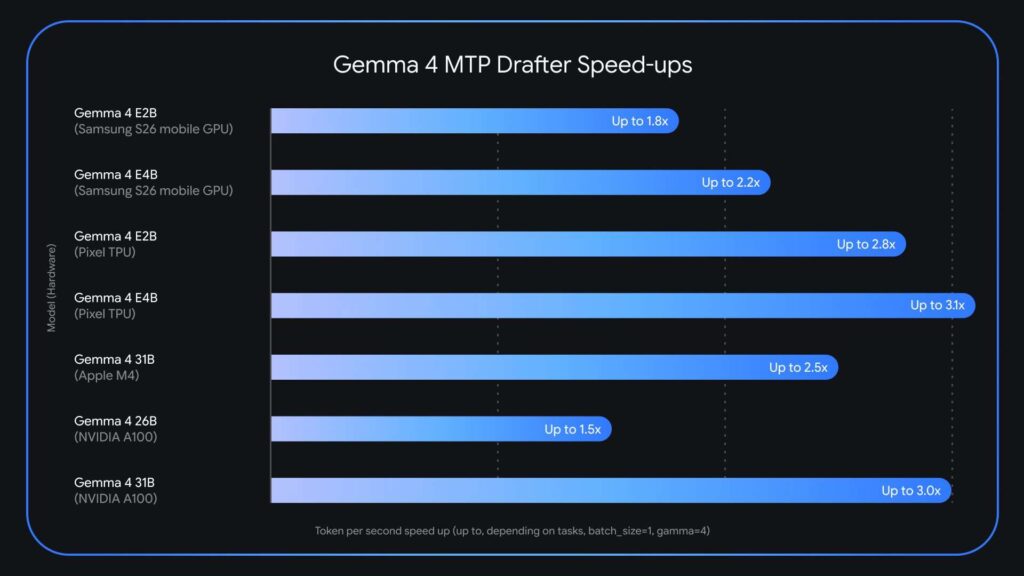
Large language models are getting incredibly powerful, but let’s be honest—their inference speed is still a massive headache for anyone trying to use them in production. Google just launched Multi-Token Prediction (MTP) drafters for the Gemma 4 model family. This specialized speculative decoding architecture can actually triple (3x) your speed at inference time, all without sacrificing a bit of output quality or reasoning accuracy. The release comes just weeks after Gemma 4 surpassed 60 million downloads and directly targets one of the most persistent pain points in deploying large language models: the memory-bandwidth bottleneck that slows token generation regardless of hardware capability. https://blog.google/innovation-and-ai/technology/developers-tools/multi-token-prediction-gemma-4/?linkId=61725841 Why LLM Inference is Slow? Today’s large language models operate autoregressively. They produce exactly one token at a time, sequentially. Every single token generation requires loading billions of model parameters from VRAM (video RAM) into compute units. This process is described as memory-bandwidth bound. The bottleneck is not the raw computing power of the GPU or processor, but the speed at which data can be transferred from memory to the compute units. The consequence is a significant latency bottleneck: compute sits underutilized while the system is busy just moving data around. What makes this especially inefficient is that the model applies the same amount of computation to a trivially predictable token like predicting “words” after “Actions speak louder than…” as it does to generating a complex logical inference. There’s no mechanism in standard autoregressive decoding to exploit how easy or hard the next token is to predict. What is Speculative Decoding? Speculative decoding is the foundational technique that Gemma 4’s MTP drafters are built on. The technique decouples token generation from verification by pairing two models: a lightweight drafter and a heavy target model. Here’s how the pipeline works in practice. The small, fast drafter model proposes several future tokens in rapid succession — a “draft” sequence — in less time than the large target model (e.g., Gemma 4 31B) takes to process even a single token. The target model then verifies all of these suggested tokens in parallel in a single forward pass. If the target model agrees with the draft, it accepts the entire sequence — and even generates one additional token of its own in the process. This means an application can output the full drafted sequence plus one extra token in roughly the same wall-clock time it would normally take to generate just one token. Since the primary Gemma 4 model retains the final verification step, the output is identical to what the target model would have produced on its own, token-by-token. There is no quality tradeoff — it is a lossless speedup. MTP: What’s New in the Gemma 4 Drafter Architecture Google has introduced several architectural enhancements that make the Gemma 4 MTP drafters particularly efficient. The draft models seamlessly utilize the target model’s activations and share its KV cache (key-value cache). The KV cache is a standard optimization in transformer inference that stores intermediate attention computations so they don’t need to be recalculated on every step. By sharing this cache, the drafter avoids wasting time recomputing context that the larger target model has already processed. Additionally, for the E2B and E4B edge models, the smallest Gemma 4 variants designed to run on mobile and edge devices — Google implemented an efficient clustering technique in the embedder layer. This specifically addresses a bottleneck prominent on edge hardware: the final logit calculation, which maps internal model representations to vocabulary probabilities. The clustering approach accelerates this step, improving end-to-end generation speed on hardware-constrained devices. For hardware-specific performance, the Gemma 4 26B mixture-of-experts (MoE) model presents unique routing challenges on Apple Silicon at a batch size of 1. However, increasing the batch size to between 4 and 8 unlocks up to a ~2.2x speedup locally. Similar batch-size-dependent gains are observed on NVIDIA A100 hardware. Key Takeaways Google has released Multi-Token Prediction (MTP) drafters for the Gemma 4 model family, delivering up to 3x faster inference speeds without any degradation in output quality or reasoning accuracy. MTP drafters use a speculative decoding architecture that pairs a lightweight drafter model with a heavy target model — the drafter proposes several tokens at once, and the target model verifies them all in a single forward pass, breaking the one-token-at-a-time bottleneck. The draft models share the target model’s KV cache and activations, and for E2B and E4B edge models, an efficient clustering technique in the embedder addresses the final logit calculation bottleneck — enabling faster generation even on memory-constrained devices. MTP drafters are available now under the Apache 2.0 license, with model weights on Hugging Face and Kaggle. Check out the Model Weights and Technical details. Also, feel free to follow us on Twitter and don’t forget to join our 130k+ ML SubReddit and Subscribe to our Newsletter. Wait! are you on telegram? now you can join us on telegram as well. Need to partner with us for promoting your GitHub Repo OR Hugging Face Page OR Product Release OR Webinar etc.? Connect with us The post Google AI Releases Multi-Token Prediction (MTP) Drafters for Gemma 4: Delivering Up to 3x Faster Inference Without Quality Loss appeared first on MarkTechPost.

Google AI Releases Multi-Token Prediction (MTP) Drafters for Gemma 4: Delivering Up to 3x Faster Inference Without Quality Loss Lire l’article »

AI, Committee, Actualités, Uncategorized

The Download: seafloor science and military chatbots

This is today’s edition of The Download, our weekday newsletter that provides a daily dose of what’s going on in the world of technology. Inexpensive seafloor-hopping submersibles could stoke deep-sea science—and mining Last week, two oblong neon submersibles started to descend nearly 6,000 meters into the Pacific Ocean. Throughout the rest of May, they will map the seafloor in search of critical mineral deposits.  If all goes well, the vehicles, built by Orpheus Ocean, could help scientists probe the vastly understudied deep sea—and the resources it holds—at a fraction of the cost of existing systems. But the same submersibles are also attracting deep-sea mining companies, raising concerns about environmental impacts. Find out why they’re drawing so much attention. —Hannah Richter The new war room: 10 Things That Matter in AI Right Now  A new kind of system has entered the war room: conversational AI tools that commanders turn to not just for analysis, but for advice.  One US defense official told MIT Technology Review that personnel might give these advice engines a list of potential targets to help decide which to strike first. China is commissioning similar tools too. But as the systems gain traction, they’re also sparking concerns about AI-generated errors, a lack of transparency, and Big Tech gaining undue influence over what information gets seen.  Here’s how these AI advice engines could impact the battlefield. —James O’Donnell The new war room is one of the 10 Things That Matter in AI Right Now, our list of the big ideas, trends, and advances in the field that are driving progress today—and will shape what’s possible tomorrow. MIT Technology Review Narrated: is fake grass a bad idea? The AstroTurf wars are far from over.  In 2001, Americans installed just over 7 million square meters of synthetic turf. By 2024, that number was 79 million square meters—enough to carpet all of Manhattan and then some. The increase worries folks who study microplastics and environmental pollution.   While the plastic-making industry insists that synthetic fields are safe if properly installed, lots of researchers think that isn’t so.  —Douglas Main  This is our latest story to be turned into an MIT Technology Review Narrated podcast, which we publish each week on Spotify and Apple Podcasts. Just navigate to MIT Technology Review Narrated on either platform, and follow us to get all our new content as it’s released. The must-reads I’ve combed the internet to find you today’s most fun/important/scary/fascinating stories about technology. 1 Elon Musk pushed OpenAI to go commercial, its president has testifiedGreg Brockman said Musk tried to turn it into a for-profit company years ago. (NYT $)+ Musk allegedly wanted full control so he could raise $80 billion to colonize Mars. (Reuters $)+ The Tesla CEO claims he intended for OpenAI to remain a non-profit. (BBC)+ Here’s what happened in week one of Musk v. Altman. (MIT Technology Review) 2 Google and Meta are building AI agents to rival OpenClawGoogle’s Gemini agent will take actions on the users’ behalf. (Business Insider)+ Meta’s will be powered by its Muse Spark AI model. (FT $)+ Hustlers are cashing in on China’s OpenClaw AI craze. (MIT Technology Review) 3 Anthropic will spend $200 billion on Google’s cloud and chipsThe investment will be spread across five years. (The Information $)+ It’s part of a broader AI compute war. (Axios)  4 DeepSeek is nearing a $45 billion valuationA state-backed “Big Fund” will lead a new investment round in the company. (FT $)+ Beijing is pushing to build alternatives to Nvidia and OpenAI. (Bloomberg $)+ Here’s why DeepSeek’s new model matters. (MIT Technology Review) 5 Anthropic is launching AI agents for banks and financial firmsThe 10 tools cover a broad mix of financial services tasks. (WSJ $)+ They’re part of a push to win over Wall Street. (Bloomberg $) 6 Apple will pay $250 million to settle an AI lawsuitIt was accused of misleading iPhone buyers about Apple Intelligence. (BBC)+ Some iPhone owners are eligible to receive up to $95. (NYT $) 7 Cheap laptops and phones may be disappearing because of AI demand Competition for memory chips is driving up gadget prices worldwide. (The Guardian) 8 Google DeepMind workers in the UK have voted to unionizeAs a result of Google’s work with the Pentagon. (Wired $) 9 Pennsylvania is suing Character.AI over chatbots posing as doctorsInvestigators say the bots claimed to hold medical licenses. (NPR)+ How well do AI health tools work? (MIT Technology Review) 10 Scientists created a “living” plastic that destroys itself on commandIt could help to eliminate microplastics. (Gizmodo) Quote of the day “I want AI to benefit humanity, not to facilitate a genocide.”  —An anonymous Google DeepMind worker tells the Guardian that Google’s work with the Israel Defense Forces had motivated their vote to unionize. One More Thing COURTESY OF BENEATH THE WAVES How tracking animal movement may save the planet For decades, wildlife researchers have dreamed of building an “Internet of Animals”—a big-data system that monitors and analyzes animal behavior to help us understand the planet. Advances in sensors, AI, and satellite technology are now bringing that vision to reality. Scientists want the system to track 100,000 sensor-tagged animals. They believe it could reveal how species respond to climate change and ecosystem loss—and even predict environmental disasters. Read the full story on how their idea could save our planet. —Matthew Ponsford We can still have nice things A place for comfort, fun and distraction to brighten up your day. (Got any ideas? Drop me a line.) + Master the art of fried chicken with this definitive chef’s guide.+ Find out why some birds hop and others walk in this breakdown of avian lifestyles.+ This vintage Hollywood map shows how California’s landscape stood in for everything from the Nile to the Alps.+ Here’s a fascinating look at the “Flatbed” airplane that was surprisingly efficient on paper but never left the hangar.

The Download: seafloor science and military chatbots Lire l’article »

AI, Committee, Actualités, Uncategorized

A blueprint for using AI to strengthen democracy

Every few centuries, changes in how information moves reshape how societies govern themselves. The printing press spread vernacular literacy, helping give rise to the Reformation and, eventually, representative government. The telegraph made it possible to administer vast nations like the US, accelerating the growth of the modern bureaucratic state. Broadcast media created shared national audiences, which in turn fueled mass democracy. We are now in the early stages of another such shift. Faster than many realize, AI is becoming the primary interface through which we form beliefs and participate in democratic self-governance. If left unchecked, this shift could further strain America’s already fragile institutions. But it could also help address long-standing problems, like lagging civic engagement and deepening polarization. What happens next depends on design choices that are already being made, whether we know it or not. Start with what might be called the epistemic layer—how we come to know things. People are increasingly relying on AI to know what is true, what is happening, and whom to trust. Search is already substantially AI-mediated. The next generation of AI assistants will synthesize information, frame it, and present it with authority. For a growing number of people, asking an AI will become the default way to form views on a candidate, a policy, or a public figure. Whoever controls what these models say therefore has increasing influence over what people believe.  Technology has always shaped the way citizens interact with information. But a new problem will soon arise in the form of personal AI agents, which can change not only how people receive information but how they act on it. These systems will conduct research, draft communications, highlight causes, and lobby on a user’s behalf. They will inform decisions such as how to vote on a ballot measure, which organizations are worth supporting, or how to respond to a government notice. They will, in a meaningful sense, begin to mediate the relationship between individuals and the institutions that govern them. We’ve already seen with social media what happens when algorithms optimize for engagement over understanding. Platforms do not need to have an explicit political agenda to produce polarization and radicalization. An agent that knows your preferences and your anxieties—one shaped to keep you engaged—poses the same risks. And in this case the risks may be even more difficult to detect, because an agent presents itself as your advocate. It speaks for you, acts on your behalf, and may earn trust precisely through that intimacy. Now zoom out to the collective. AI agents and humans could soon participate in the same forums, where it may be impossible to tell them apart. Even if every individual AI agent were well-designed and aligned with its user’s interests, the interactions of millions of agents could produce outcomes that no individual wanted or chose. For example, research shows that agents displaying no individual bias can still generate collective biases at scale. And setting aside what agents do to each other, there is what they do for their users. A public sphere in which everyone has a personalized agent attuned to their existing views is not, in aggregate, a public sphere at all. It is a collection of private worlds, each internally coherent but collectively inhospitable to the kind of shared deliberation that democracy requires. Taken together, these three transformations—in how we know, how we act, and how we engage in collective governance—amount to a fundamental change in the texture of citizenship. In the near future, people will form their political views through AI filters, exercise their civic agency through AI agents, and participate in institutions and public discussions that are themselves shaped by the interactions of millions of such agents. Today’s democracy is not ready for this. Our institutions were designed for a world in which power was exercised visibly, information traveled slowly enough to be contested, and reality felt more shared, if imperfectly. All of this was already fraying long before generative AI arrived. And yet this need not be a story of decline. Avoiding that outcome requires us to design for something better. On the informational layer, AI companies must ramp up existing efforts to ensure that models’ outputs are truthful. They should also explore some promising early findings that AI models can help reduce polarization. A recent field evaluation of AI-generated fact checks on X found that people with a variety of political viewpoints deemed AI-written notes more helpful than human-written ones. The paper is yet to be peer-reviewed, but that is a potentially revolutionary finding: AI-assisted fact-checking may be able to achieve the kind of cross-partisan credibility that has eluded most manual human efforts. Greater understanding of and transparency about how models make these assertions and prioritize sources in the process could help build further public trust. On the agentic layer, we need ways to evaluate whether AI agents faithfully represent their users. An agent must never have an agenda of its own or misrepresent its user’s views—a technically daunting requirement in domains where users may have not explicitly stated any preferences. But faithful representation also cannot become an accessory to motivated reasoning. An agent that refuses to present uncomfortable information, that shields its user from ever questioning prior beliefs or fails to adjust to a change of heart, is not acting in the person’s best interest. Finally, on the institutional level, policymakers should hurry to harness AI’s potential to make governance more responsive and legitimate. Several states and localities are already using AI-mediated platforms to conduct democratic deliberation at scale, building on research showing that AI mediators can help citizens find common ground. As agents become increasingly common participants in public input processes—and there is already evidence that bots are skewing those processes—identity verification for both humans and their agentic proxies must be built in from the start. What is needed is a new generation of democratic infrastructure, technological and institutional, built for the world that is actually here. Failing to design for democratic outcomes, in a domain this consequential,

A blueprint for using AI to strengthen democracy Lire l’article »

AI, Committee, Actualités, Uncategorized

Google Adds Event-Driven Webhooks to the Gemini API, Eliminating the Need for Polling in Long-Running AI Jobs

If you’ve ever built a production AI pipeline that runs long jobs — processing thousands of prompts overnight, kicking off a Deep Research agent, or generating a long video — you’ve almost certainly dealt with the polling problem. Your code sits in a loop, firing GET requests every few seconds asking, “Is the job done yet?” It’s wasteful, it adds latency, and at scale it becomes a reliability headache. Google just shipped the fix. Google introduced event-driven Webhooks for the Gemini API — a push-based notification system that eliminates the need for inefficient polling. The feature is available now for all developers using the Gemini API and targets a core pain point in agentic and high-volume AI workflows. Why Polling Breaks Down at Scale To understand the problem, it helps to know what Long-Running Operation (LRO) is. Webhooks allow the Gemini API to push real-time notifications to your server when asynchronous or Long-Running Operations complete, replacing the need to poll the API for status updates and reducing latency and overhead. Before webhooks, the only option was continuous polling — repeatedly calling GET /operations to check if a job had finished. As Gemini shifts toward agentic workflows and high-volume processing — like Deep Research, long video generation, or processing thousands of prompts via the Batch API — operations can take minutes or even hours. Polling for hours is expensive in both compute and API quota, and it introduces unnecessary delays between when a job completes and when your application learns about it. The fix is conceptually simple: instead of your code asking “are you done?” repeatedly, the Gemini API calls your server the moment a task finishes, by pushing a real-time HTTP POST payload to your endpoint the instant a task completes. Two Configuration Modes: Static and Dynamic The Gemini API supports two ways to configure webhooks. Static webhooks are project-level endpoints configured with the WebhookService API and are suited for global integrations like notifying Slack or syncing a database — they are registered once per project and trigger for any matching event. Dynamic webhooks are request-level overrides that pass a webhook URL in the webhook_config payload of a specific job call, making them ideal for routing specific jobs to dedicated endpoints, for example in agent-orchestration queues. You can think of static webhooks like a standing instruction to your mail carrier: “Always deliver packages to the front desk.” Dynamic webhooks are more like saying: “For this one shipment, send it to my home address.” An additional feature of dynamic webhooks is the user_metadata field, which lets you attach arbitrary key-value metadata to a job at dispatch time — for example, {“job_group”: “nightly-eval”, “priority”: “high”}. This metadata travels with the job notification and is particularly useful when you need to fan out different job types to different downstream processors without building a separate tracking layer. Security Architecture: Standard Webhooks, HMAC, and JWKS Security is where this implementation gets technically interesting. Google’s implementation strictly adheres to the Standard Webhooks specification. Every request is signed using webhook-signature, webhook-id, and webhook-timestamp headers, ensuring idempotency and preventing replay attacks. For static webhooks, the signing is done with HMAC (Hash-based Message Authentication Code) using a symmetric shared secret, which is provided once at creation time and must be stored securely in your environment variables — the API returns this signing secret only once and it cannot be retrieved again. If you lose it, you have to rotate it. The rotation endpoint supports a revocation_behavior parameter — specifically REVOKE_PREVIOUS_SECRETS_AFTER_H24, which keeps the old secret valid for a 24-hour grace period so you can safely transition production systems, or an immediate revocation option for incident response. For dynamic webhooks, Google uses asymmetric public-key JWKS (JSON Web Key Set) signatures instead of symmetric secrets. Dynamic webhook requests emit a JSON Web Token (JWT) signature, and your listener must extract and verify it using Google’s public certificate endpoints at https://generativelanguage.googleapis.com/.well-known/jwks.json. The RS256 algorithm is used for this verification. This means your server never blindly trusts incoming requests — every webhook hit can be cryptographically verified before you act on it. The webhook-timestamp header is particularly important: best practices call for always validating this timestamp and rejecting payloads older than five minutes to mitigate replay attacks. Thin Payloads and the Event Catalog One architectural decision worth noting is the thin payload model. To avoid bandwidth congestion, Gemini webhooks deliver a snapshot containing status details and pointers to results, rather than the raw output file itself. The exact fields in that snapshot depend on the event type. For batch jobs, a completed notification carries the job id and an output_file_uri pointing to your results — for example, a Cloud Storage path like gs://my-bucket/results.jsonl. For video generation, the video.generated event delivers a different set of fields: file_id and video_uri. Your server-side handler needs to branch on event type before reading the payload data fields. The full event catalog covers three categories: batch jobs (batch.succeeded, batch.cancelled, batch.expired, batch.failed), Interactions API operations (interaction.requires_action, interaction.completed, interaction.failed, interaction.cancelled), and video generation (video.generated). For developers writing code: the official code samples in Google’s documentation subscribe to and handle batch.completed rather than batch.succeeded — both appear across the documentation, so match whichever your implementation uses. The Interactions API, for readers unfamiliar with it, is Gemini’s API for async multi-turn agent conversations. The interaction.requires_action event is particularly useful — it fires when a function call is pending and your application needs to step in and take an action before the agent can continue. Delivery Guarantees and Best Practices Google guarantees “at-least-once” delivery with automatic retries for up to 24 hours using exponential backoff. The “at-least-once” guarantee means your endpoint could occasionally receive the same event more than once under high-congestion conditions. The consistent webhook-id header should be used to deduplicate these. Your server should also respond with a 2xx status code immediately upon valid signature detection and queue any heavier parsing internally — prolonged listener hold times trigger the retry cycle, which is the opposite of what you want. Key

Google Adds Event-Driven Webhooks to the Gemini API, Eliminating the Need for Polling in Long-Running AI Jobs Lire l’article »

AI, Committee, Actualités, Uncategorized

A Coding Guide to Survey Bias Correction Using Facebook Research Balance with IPW CBPS Ranking and Post Stratification Methods

In this tutorial, we walk through a complete, end-to-end workflow for correcting bias in survey data using the balance library. We simulate a realistic population, deliberately introduce sampling bias, and then apply multiple re-weighting techniques to recover unbiased estimates. We focus on four widely used methods: Inverse Probability Weighting (IPW), Covariate Balancing Propensity Scores (CBPS), ranking, and post-stratification, and evaluate how effectively each method restores balance between the sample and the target population. Throughout the process, we analyze diagnostics such as ASMD, outcome estimates, and design effects to build a strong intuitive and practical understanding of survey weighting. Copy CodeCopiedUse a different Browser import subprocess, sys subprocess.check_call([sys.executable, “-m”, “pip”, “install”, “-q”, “balance”]) import numpy as np import pandas as pd import matplotlib.pyplot as plt import seaborn as sns import warnings warnings.filterwarnings(“ignore”) from balance import Sample np.random.seed(2024) sns.set_theme(style=”whitegrid”, context=”notebook”) We begin by installing the balance package and importing all the required libraries for data manipulation and visualization. We set a random seed to ensure reproducibility and configure plotting aesthetics for clearer diagnostics. This setup prepares a clean, consistent environment for running the full reweighting workflow. Copy CodeCopiedUse a different Browser def simulate_population(n=50_000): age = np.clip(np.random.normal(45, 17, n), 18, 90).astype(int) gender = np.random.choice([“M”, “F”], size=n, p=[0.49, 0.51]) education = np.random.choice( [“HS”, “SomeCollege”, “Bachelor”, “Graduate”], size=n, p=[0.35, 0.25, 0.25, 0.15], ) income = np.exp(np.random.normal(10.5, 0.5, n)) region = np.random.choice( [“Urban”, “Suburban”, “Rural”], size=n, p=[0.40, 0.35, 0.25] ) happiness = ( 50 + 0.20 * (age – 45) + (education == “Graduate”) * 8 + (education == “Bachelor”) * 4 + (region == “Urban”) * 3 + np.log(income) * 2 + np.random.normal(0, 5, n) ) return pd.DataFrame({ “id”: np.arange(n).astype(str), “age”: age, “gender”: gender, “education”: education, “income”: income.round(2), “region”: region, “happiness”: happiness.round(2), }) def biased_sample(pop, n=2_000): score = ( -0.04 * (pop[“age”] – 30) + (pop[“education”] == “Graduate”) * 1.0 + (pop[“education”] == “Bachelor”) * 0.6 + (pop[“region”] == “Urban”) * 0.7 – (pop[“region”] == “Rural”) * 0.5 ) p = 1 / (1 + np.exp(-score)) p = p / p.sum() idx = np.random.choice(pop.index, size=n, replace=False, p=p) return pop.loc[idx].reset_index(drop=True) target_df = simulate_population(50_000) sample_df = biased_sample(target_df, 2_000) target_for_balance = target_df.drop(columns=[“happiness”]) print(f”Sample size : {len(sample_df):,}”) print(f”Target size : {len(target_for_balance):,}”) print(f”nTRUE population mean happiness : {target_df[‘happiness’].mean():.2f}”) print(f”Naive sample mean happiness : {sample_df[‘happiness’].mean():.2f} <– biased!”) We simulate a realistic population dataset with demographic and socioeconomic features along with an outcome variable. We then introduce sampling bias by preferentially selecting younger, more educated, and urban individuals to mimic real-world survey bias. Finally, we compare the naive sample mean to the true population mean to highlight bias. Copy CodeCopiedUse a different Browser sample = Sample.from_frame( sample_df, id_column=”id”, outcome_columns=[“happiness”] ) target = Sample.from_frame(target_for_balance, id_column=”id”) sample_with_target = sample.set_target(target) print(“n— Sample object —“) print(sample_with_target) print(“n” + “=” * 60) print(” PRE-ADJUSTMENT DIAGNOSTICS”) print(“=” * 60) asmd_before = sample_with_target.covars().asmd() print(“nASMD (Absolute Standardized Mean Difference) — lower = better balance”) print(“Rule of thumb: |ASMD| > 0.10 indicates meaningful imbalance.”) print(asmd_before.T.round(3)) print(“nMean of covariates (sample vs target):”) print(sample_with_target.covars().mean().T.round(3)) We convert both the biased sample and the target population into structured Sample objects for processing. We compute pre-adjustment diagnostics, such as ASMD and covariate means, to quantify imbalance between the sample and the target. This step helps us clearly understand how far the sample deviates before applying any correction. Copy CodeCopiedUse a different Browser print(“n” + “=” * 60) print(” FITTING WEIGHTS — 4 METHODS”) print(“=” * 60) print(“n>>> [1/4] IPW with LASSO logistic regression”) adjusted_ipw = sample_with_target.adjust(method=”ipw”) print(adjusted_ipw.summary()) print(“n>>> [2/4] CBPS — Covariate Balancing Propensity Score”) try: adjusted_cbps = sample_with_target.adjust(method=”cbps”) print(adjusted_cbps.summary()) except Exception as e: print(“CBPS failed (skipping):”, e) adjusted_cbps = None print(“n>>> [3/4] Raking (iterative proportional fitting)”) adjusted_rake = sample_with_target.adjust(method=”rake”) print(adjusted_rake.summary()) print(“n>>> [4/4] Post-stratification (categoricals only)”) cat_cols = [“id”, “gender”, “education”, “region”] sample_cat = Sample.from_frame( sample_df[cat_cols + [“happiness”]], id_column=”id”, outcome_columns=[“happiness”], ) target_cat = Sample.from_frame(target_for_balance[cat_cols], id_column=”id”) adjusted_post = sample_cat.set_target(target_cat).adjust(method=”poststratify”) print(adjusted_post.summary()) print(“n” + “=” * 60) print(” METHOD COMPARISON”) print(“=” * 60) methods = { “IPW”: adjusted_ipw, “CBPS”: adjusted_cbps, “Rake”: adjusted_rake, “PostStrat”: adjusted_post, } def safe_mean_asmd(asmd_df, prefer=”self”): “””Mean ASMD across covariates from a balance asmd DataFrame.””” row = prefer if prefer in asmd_df.index else asmd_df.index[0] if “mean(asmd)” in asmd_df.columns: return float(asmd_df.loc[row, “mean(asmd)”]) return float(asmd_df.loc[row].mean()) asmd_means = {“Unadjusted”: safe_mean_asmd(asmd_before)} outcome_means = {“Naive sample”: float(sample_df[“happiness”].mean())} deff_vals = {} for name, m in methods.items(): if m is None: continue asmd_means[name] = safe_mean_asmd(m.covars().asmd(), prefer=”self”) outcome_means[name] = float(m.outcomes().mean()[“happiness”].iloc[0]) w = m.to_df()[“weight”].values deff_vals[name] = (w.sum() ** 2) / (len(w) * np.sum(w ** 2)) outcome_means[“TRUE pop”] = float(target_df[“happiness”].mean()) print(“nMean ASMD across covariates (lower = better balance):”) for k, v in asmd_means.items(): print(f” {k:14s}: {v:.4f}”) print(“nWeighted estimate of mean happiness:”) for k, v in outcome_means.items(): print(f” {k:14s}: {v:.3f}”) print(“nKish’s effective sample-size ratio (1.0 = no info loss):”) for k, v in deff_vals.items(): print(f” {k:14s}: {v:.3f} (n_eff ≈ {int(v * len(sample_df))})”) We apply four different weighting methods, IPW, CBPS, ranking, and post-stratification, to adjust the biased sample. We evaluate each method using balance metrics, outcome estimates, and calculations of effective sample size. This comparison allows us to understand how different techniques trade off bias reduction and variance. Copy CodeCopiedUse a different Browser fig, axes = plt.subplots(2, 2, figsize=(14, 10)) colors_a = [“gray”, “#1f77b4”, “#ff7f0e”, “#2ca02c”, “#d62728″][: len(asmd_means)] axes[0, 0].bar(list(asmd_means.keys()), list(asmd_means.values()), color=colors_a) axes[0, 0].axhline(0.1, ls=”–“, color=”red”, label=”0.10 imbalance threshold”) axes[0, 0].set_title(“Mean ASMD across covariates”) axes[0, 0].set_ylabel(“Mean ASMD”); axes[0, 0].legend() axes[0, 0].tick_params(axis=”x”, rotation=20) truth = target_df[“happiness”].mean() colors_b = [“#888”] + [“#1f77b4”, “#ff7f0e”, “#2ca02c”, “#d62728”][: len(methods)] + [“black”] axes[0, 1].bar(list(outcome_means.keys()), list(outcome_means.values()), color=colors_b[: len(outcome_means)]) axes[0, 1].axhline(truth, ls=”–“, color=”black”, label=f”truth = {truth:.2f}”) axes[0, 1].set_title(“Estimated mean happiness vs ground truth”) axes[0, 1].set_ylabel(“Mean happiness”); axes[0, 1].legend() axes[0, 1].tick_params(axis=”x”, rotation=20) w_ipw = adjusted_ipw.to_df()[“weight”].values axes[1, 0].hist(w_ipw, bins=40, color=”steelblue”, edgecolor=”white”) axes[1, 0].set_title( f”IPW weight distributionn” f”min={w_ipw.min():.2f} median={np.median(w_ipw):.2f} max={w_ipw.max():.2f}” ) axes[1, 0].set_xlabel(“weight”); axes[1, 0].set_ylabel(“count”) ages = sample_df[“age”].values bins = np.linspace(18, 90, 31) axes[1, 1].hist(target_df[“age”], bins=bins, density=True, alpha=0.45, color=”green”, label=”Target (truth)”) axes[1, 1].hist(ages, bins=bins, density=True, alpha=0.45, color=”red”, label=”Sample (biased)”) axes[1, 1].hist(ages, bins=bins, density=True, alpha=0.45, color=”blue”, weights=w_ipw, label=”Sample (IPW-weighted)”) axes[1, 1].set_title(“Age distribution: bias correction by IPW”) axes[1, 1].set_xlabel(“Age”); axes[1, 1].set_ylabel(“density”); axes[1, 1].legend() plt.tight_layout() plt.savefig(“balance_diagnostics.png”, dpi=110, bbox_inches=”tight”) plt.show() print(“n” + “=” * 60) print(” ADVANCED — controlling variance with max_de”)

A Coding Guide to Survey Bias Correction Using Facebook Research Balance with IPW CBPS Ranking and Post Stratification Methods Lire l’article »

AI, Committee, Actualités, Uncategorized

The Download: inside the Musk v. Altman trial, and AI for democracy

This is today’s edition of The Download, our weekday newsletter that provides a daily dose of what’s going on in the world of technology. Week one of the Musk v. Altman trial: what it was like in the room Two of the most powerful figures in AI—Sam Altman and Elon Musk—are in the middle of a landmark legal showdown, with Musk alleging he was misled about OpenAI becoming a for-profit company. Our reporter Michelle Kim, who also happens to be a lawyer, has been in court each day, and has broken down the first week’s key moments in her latest report. In a new Q&A, she also reveals what it was like in the room, the new details that have emerged about how Musk and OpenAI operate—and what we can expect from this week’s proceedings. Find out what she’s discovered so far, and if you want to keep up with MIT Technology Review’s ongoing coverage of the Musk v. Altman trial, follow @techreview or @michelletomkim on X. —James O’Donnell This story is from The Algorithm, our weekly newsletter giving you the inside track on all things AI. Sign up to receive it in your inbox every Monday.  A blueprint for using AI to strengthen democracy —Andrew Sorota & Josh Hendler lead work on AI and democracy at the Office of Eric Schmidt. Faster than many realize, AI is becoming the primary interface through which we form beliefs and participate in democratic self-governance. This shift could further strain already fragile institutions, but it could also help address problems like polarization and declining civic engagement. What happens next depends on design choices that are already being made, whether we know it or not. Here’s how we can harness AI to strengthen democracy. Artificial scientists: 10 Things That Matter in AI Right Now Large language models can already assist scientists in all sorts of ways, from writing code to searching through literature and drafting articles. But companies and labs have a much more ambitious vision. They want to build AI systems that can act as a full member of a scientific team—and even conduct entire research projects. These artificial scientists seem like a win for frontier labs and for society at large. But they could also narrow the scope of scientific inquiry. Read the full story on how artificial scientists could reshape the research process—and what might be lost along the way. —Grace Huckins Artificial scientists is an item on our list of the 10 Things That Matter in AI Right Now, MIT Technology Review’s guide to what’s really worth your attention in the busy, buzzy world of AI. We’re unpacking one item from the list each day here in The Download, so stay tuned. The must-reads I’ve combed the internet to find you today’s most fun/important/scary/fascinating stories about technology. 1 The Pentagon has struck sweeping AI deals for classified workIt’s signed contracts with Microsoft, Nvidia, AWS, and Reflection AI. (NYT $)+ It wants the US military to be an “AI-first” force. (BBC)+ The announcement leaves Anthropic increasingly isolated. (WP $)+ Here’s how the firms could train on classified data. (MIT Technology Review) 2 Elon Musk has finally settled the SEC lawsuit over the Twitter purchaseHe’s agreed to pay a $1.5 million fine for waiting too long to disclose his initial stock purchases. (Guardian)+ But won’t lose any of the $150 million he allegedly saved. (The Verge)+ Musk allegedly illegally hid his growing Twitter stake. (CBS News) 3 A Chinese court has ruled that firms can’t lay off workers on AI groundsThey can’t terminate employees just to replace them with AI. (Bloomberg $)+ The court said a firm had illegally fired one of its workers. (NPR)+ Chinese tech workers are starting to train their AI doubles—and pushing back. (MIT Technology Review) 4 A gene therapy is helping deaf children hear againIn a trial, 80% of patients gained measurable hearing. (Vox) 5 The White House is vetting AI models before they’re releasedIt may create a new working group to oversee AI development. (NYT $)+ A war over AI regulation is coming to the US. (MIT Technology Review) 6 Nature has retracted a paper on ChatGPT’s educational benefitsOver “discrepancies” and a lack of confidence in the findings. (404 Media)+ The paper had already racked up hundreds of citations. (Ars Technica)+ AI giants want to take over the classroom. (MIT Technology Review) 7 GameStop made a $56 billion bid for eBayeBay said it was reviewing the offer. (Ars Technica)+ The bid has drawn skepticism from investors and analysts. (Reuters $) 8 AI systems are increasingly used to monitor workers’ emotionsNew tools claim to measure “agreeability” as well as productivity. (The Atlantic $) 9 Peter Thiel is backing wave-powered data centersHe’s leading a $140 million investment into a startup developing the tech. (FT $) 10 Ask Jeeves is shutting down after nearly 30 years onlineThe closure marks the end of one of the internet’s earliest search engines. (NYT $) Quote of the day “By the end of this week, you and Sam will be the most hated men in America.”  —Elon Musk texted a warning to OpenAI president Greg Brockman two days before their courtroom battle started, NBC News reports. One More Thing SIMON MITCHELL Meet the divers trying to figure out how deep humans can go Two hundred and thirty meters into one of the deepest underwater caves on Earth, a team of extreme divers tested a route to new depth records: breathing hydrogen. They believe the gas could help the human body withstand underwater pressure significantly past its natural threshold. But the approach is highly experimental—and dangerous. Find out how far they’re willing to go. —Samantha Schuyler We can still have nice things A place for comfort, fun and distraction to brighten up your day. (Got any ideas? Drop me a line.) + Wild horses are roaming in Spain for the first time in 10,000 years.+ Star Wars meets the Renaissance in this bardcore cover of the “Imperial March.”+ Improve your writing by avoiding these

The Download: inside the Musk v. Altman trial, and AI for democracy Lire l’article »

AI, Committee, Actualités, Uncategorized

MoDAl: Self-Supervised Neural Modality Discovery via Decorrelation for Speech Neuroprosthesis

arXiv:2605.00025v1 Announce Type: cross Abstract: Speech neuroprosthesis systems decode intended speech from neural activity in the absence of audible output, offering a path to restoring communication for individuals with speech-impairing conditions. Current approaches decode predominantly from motor cortical areas, discarding others — such as area 44, part of Broca’s area — that may encode complementary linguistic information. We introduce MoDAl (Modality Decorrelation and Alignment), a framework that discovers complementary neural modalities through the interplay of two objectives in a shared projection space. A contrastive loss aligns each of several parallel brain encoders with the text embeddings of a pretrained large language model (LLM), while a decorrelation loss prevents the encoders from coalescing to duplicative representations. We prove that these objectives are in productive tension: Contrastive alignment induces transitive modality coalescence, which decorrelation must counteract for the framework to discover diverse neurolinguistic modalities. On the Brain-to-Text Benchmark ’24, MoDAl reduces word error rate (WER) from 26.3% to 21.6% compared to the previous best end-to-end method, with the gain from incorporating previously discarded area 44 signals arising entirely from the decorrelation mechanism. Analysis of the discovered modalities reveals functional specialization: Encoders receiving area 44 input capture structural and syntactic properties (sentence length, grammatical voice, wh-words), consistent with the neurolinguistic understanding of Broca’s area.

MoDAl: Self-Supervised Neural Modality Discovery via Decorrelation for Speech Neuroprosthesis Lire l’article »

We use cookies to improve your experience and performance on our website. You can learn more at Politique de confidentialité and manage your privacy settings by clicking Settings.

Privacy Preferences

You can choose your cookie settings by turning on/off each type of cookie as you wish, except for essential cookies.

Allow All
Manage Consent Preferences
  • Always Active

Save
fr_FR