Moonshot AI Releases Kimi Code CLI: A Terminal AI Coding Agent Built in TypeScript for Next-Gen Agents
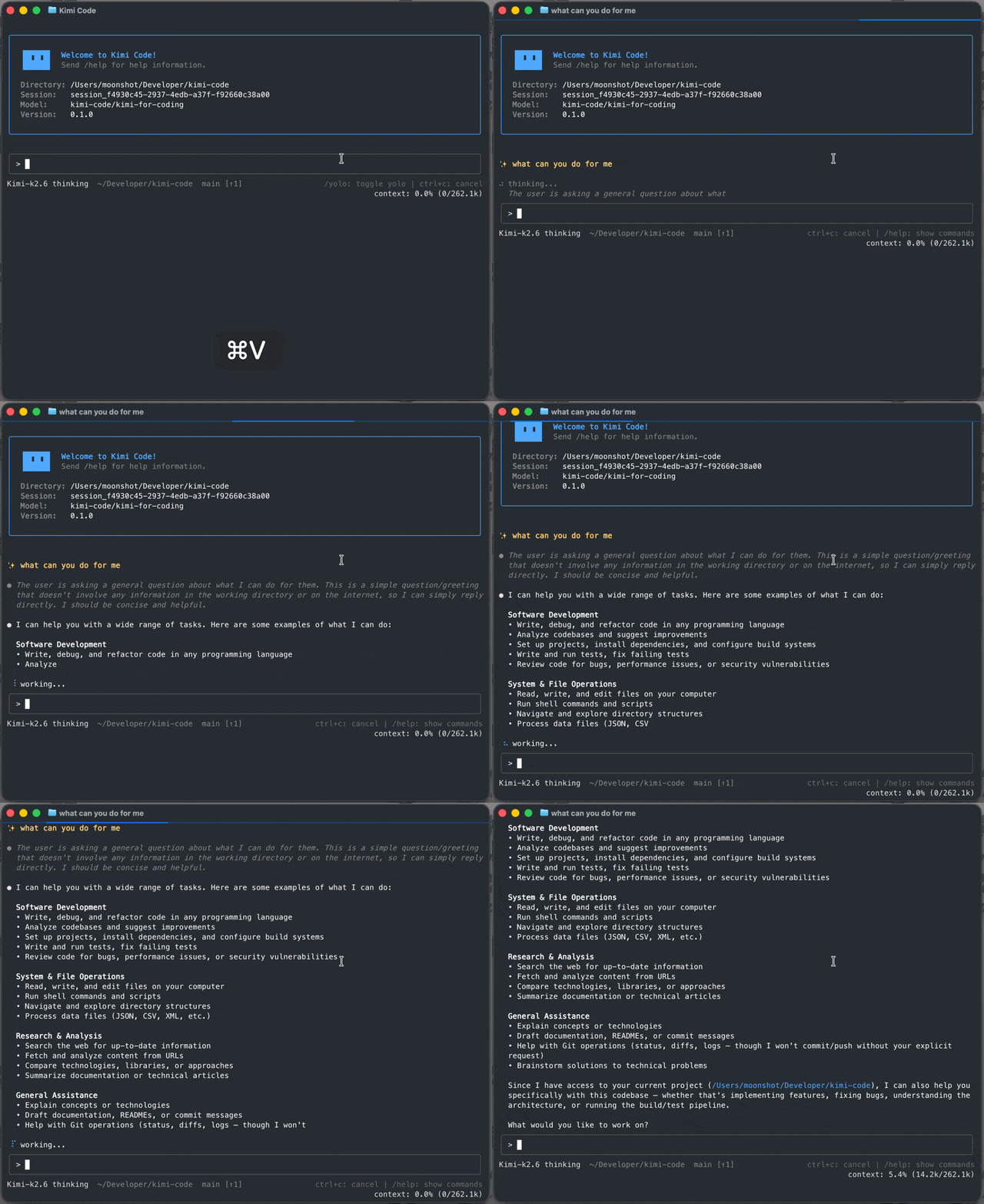
Moonshot AI has released Kimi Code CLI, an open-source coding agent that runs in the terminal. The tool reads and edits code, runs shell commands, searches files, and fetches web pages. It then chooses its next step based on the feedback it receives. The project is MIT-licensed and lives on GitHub.. Kimi Code CLI is the successor to the older kimi-cli. The new agent is written in TypeScript and distributed via npm. It works out of the box with Moonshot AI’s Kimi models. It can also be configured to use other compatible providers. What is Kimi Code CLI Kimi Code CLI is an AI agent for software development and terminal operations. It can implement new features, fix bugs, and complete refactors. It can also explore an unfamiliar codebase and answer architecture questions. Batch file processing, builds, and chained test runs are supported too. The execution model is feedback-driven. The agent plans steps, modifies code, runs tests, and reports its actions. Read-only operations run automatically by default. For file edits or shell commands, the agent asks for confirmation first. This approval flow keeps risky actions under developer control. The CLI itself is free and MIT-licensed. Model access requires Kimi Code OAuth or a Moonshot AI Open Platform API key. https://github.com/MoonshotAI/kimi-code Key Features Moonshot lists several features aimed at long, focused agent sessions: Single-binary distribution. One command installs it, with no Node.js setup required. Fast startup. Moonshot says the TUI is ready in milliseconds. Purpose-built TUI. The interface is tuned for extended agent sessions. Video input. Drop a screen recording or demo clip into the chat. AI-native MCP configuration. Add and authenticate Model Context Protocol servers via /mcp-config. Subagents for parallel work. Dispatch built-in coder, explore, and plan subagents in isolated contexts. Lifecycle hooks. Run local commands to gate tool calls, audit decisions, or trigger notifications. Installation and First Run Two installation paths exist. The official script needs no pre-installed Node.js. On macOS or Linux, run the install script: Copy CodeCopiedUse a different Browser curl -fsSL https://code.kimi.com/kimi-code/install.sh | bash On Windows, use PowerShell: Copy CodeCopiedUse a different Browser irm https://code.kimi.com/kimi-code/install.ps1 | iex The global npm install requires Node.js 24.15.0 or later: Copy CodeCopiedUse a different Browser npm install -g @moonshot-ai/kimi-code Verify the binary, then open a project and start the interactive UI: Copy CodeCopiedUse a different Browser kimi –version cd your-project kimi On first launch, type /login inside the UI. You can choose Kimi Code OAuth or a Moonshot AI Open Platform API key. To run one instruction without the UI, use kimi -p “your task”. To resume the previous session, add -C. Use Cases Understanding a project: Ask for an architecture overview and a module dependency diagram. Implementing a feature: Describe the signature, options, and acceptance criteria up front. Fixing a bug: Give the symptom, reproduction steps, and expected behavior together. Writing tests and refactoring: Extract repeated patterns, then run tests to confirm behavior. One-off automation: Analyze logs and output call counts with p50 and p99 latencies. Scheduled tasks: Ask the agent to set reminders or recurring checks via cron. Plan mode is available through Shift-Tab or kimi –plan. It outputs a research plan before touching files. For safe batch work, –yolo or /yolo skips approval prompts. The /fork command creates an experimental branch you can abandon. The /compact command compresses context to free up tokens. For large investigations, the main agent can dispatch subagents in parallel. How Kimi Code CLI Compares Kimi Code CLI joins several established terminal coding agents. The table below compares it with three of them. Competitor details reflect mid-2026 and can change quickly. Attribute Kimi Code CLI Claude Code OpenAI Codex CLI Gemini CLI Developer Moonshot AI Anthropic OpenAI Google Backing model Kimi models Claude models GPT-5.3-Codex Gemini 2.5 Pro Language / runtime TypeScript Node.js Rust TypeScript Install Script or npm (Node.js ≥ 24.15.0) Native installer or npm npm / native npm single binary MCP support Yes (/mcp-config) Yes Yes Yes Subagents Yes (coder, explore, plan) Yes Yes No (sequential) Plan mode Yes (Shift-Tab) Yes Yes Yes IDE integration ACP (Zed, JetBrains) VS Code, JetBrains VS Code, IDEs VS Code (Code Assist) License MIT Proprietary Open source Apache 2.0 All four agents support the Model Context Protocol. They differ on backing model, language, license, and orchestration. Kimi Code CLI and Codex CLI both ship native subagents. Gemini CLI runs tasks sequentially without subagent support. Key Takeaways Kimi Code CLI is an MIT-licensed terminal coding agent from Moonshot AI. It is written in TypeScript and installs via script or npm. Built-in coder, explore, and plan subagents run in isolated contexts. MCP servers are configured conversationally through /mcp-config, not raw JSON. It succeeds kimi-cli and migrates existing configuration and sessions. Marktechpost’s Visual Explainer Kimi Code CLI · Guide 01 / 09 Overview Kimi Code CLI Moonshot AI’s open-source terminal coding agent that reads code, runs commands, and plans its next step. Runs in your terminal as an AI coding agent MIT-licensed · written in TypeScript · distributed via npm Works with Kimi models or other compatible providers Slide 02 What Is Kimi Code CLI? Reads and edits code, runs shell commands, searches files Fetches web pages and chooses the next step from feedback Read-only actions run automatically by default File edits and shell commands ask for confirmation first Slide 03 Key Features Single-binary distribution — no Node.js setup required Built-in coder, explore, and plan subagents AI-native MCP configuration via /mcp-config Lifecycle hooks and video input support Slide 04 Install macOS / Linux curl -fsSL https://code.kimi.com/kimi-code/install.sh | bash Windows (PowerShell) irm https://code.kimi.com/kimi-code/install.ps1 | iex npm (Node.js 24.15.0+) npm install -g @moonshot-ai/kimi-code Slide 05 First Run kimi –version cd your-project kimi Type /login → Kimi Code OAuth or Moonshot API key kimi -p “your task” runs one instruction without the UI kimi -C resumes the previous session Slide 06 Use Cases Understand a project: architecture overview and dependency map Implement features with clear signatures and acceptance criteria Fix bugs from symptom, reproduction steps, and expected behavior Write tests, refactor,