YouZum

Uncategorized

AI, Committee, ข่าว, Uncategorized

Musk v. Altman week 2: OpenAI fires back, and Shivon Zilis reveals that Musk tried to poach Sam Altman

In the second week of the landmark trial between Elon Musk and OpenAI, Musk’s motivations for bringing the suit were under scrutiny. Last week, Musk took the stand, alleging that OpenAI CEO Sam Altman and president Greg Brockman had deceived him into donating $38 million to the company. He claimed that they’d promised to maintain it as a nonprofit dedicated to developing AI for the benefit of humanity, only to later accept billions of dollars of investment from Microsoft and restructure the company to operate a for-profit subsidiary.   This week, Brockman fired back with his side of the story, arguing that Musk had actually pushed for OpenAI to create a for-profit arm and fought a bitter battle to have “absolute control” over it. OpenAI has argued that Musk is suing because he didn’t get his way and is now trying to undermine a competitor to his own AI company, xAI. Shivon Zilis, a former OpenAI board member and the mother of four of Musk’s children, also testified, revealing that Musk tried to recruit OpenAI CEO Sam Altman to lead a new AI lab at his electric-car company, Tesla.  Musk cofounded OpenAI in 2015 with Altman, Brockman, and others but left in 2018. Now, he’s asking the court to remove Altman and Brockman from their roles and to unwind the restructuring OpenAI undertook last year, which converted its for-profit subsidiary into a public benefit corporation. He is also seeking as much as $134 billion in damages from OpenAI and Microsoft, OpenAI’s investor.  The outcome of the trial could upend OpenAI’s race toward an IPO at a valuation approaching $1 trillion. Meanwhile, xAI, which Musk founded in 2023, is now a division of his rocket company, SpaceX; the combined companies are also expected to go public as early as June, at a target valuation of $1.75 trillion. On Monday, Brockman walked into the courtroom in a blue suit and tie, holding hands with his wife, Anna Brockman. On the stand, he was serene, even chipper, as he recalled OpenAI’s early days. But he grew agitated under impassioned questioning from Elon Musk’s lawyer, Steven Molo. Altman listened in silence, while Anna Brockman sat behind him, fidgeting. Outside the courthouse, protesters rallying against the AI race sang hymns over the voices of lawyers giving press conferences. Two days before trial began, according to Brockman, Musk messaged him to ask if he would be interested in settling. When Brockman suggested that both sides drop their claims, Musk texted back: “By the end of this week, you and Sam will be the most hated men in America. If you insist, so it will be.” Musk stormed out with a Tesla painting Last week, Musk testified that he’s suing to save OpenAI’s nonprofit mission to develop AI safely, but he said he was open to seeing OpenAI become a capped-profit company with moderate investments from Microsoft.  This week, Brockman told the jury that Musk was never truly committed to keeping OpenAI a nonprofit. In the summer of 2017, when an AI model that OpenAI built beat the world’s best players in a video game called Dota 2, Musk hosted a gathering at his “Haunted Mansion” near San Francisco. The house was splattered with confetti and cups, Brockman recalled, and the actress Amber Heard, who was Musk’s girlfriend at the time, served whiskey. “Time to make the next step for OpenAI. This is the triggering event,” Musk wrote in an email—having said weeks earlier that if OpenAI made a major public achievement, it would be “time to create a for-profit,” Brockman told the jury. Over the next six weeks, Brockman said, Musk and the other cofounders had intense discussions about creating a for-profit entity to raise enough capital to build artificial general intelligence—powerful AI that can compete with humans on most cognitive tasks. Musk wanted to have majority equity in the entity and the right to choose a majority of the board members. He also wanted to be its CEO, said Brockman.  Brockman testified that in August 2017, he and other cofounders gathered to hash out the terms of the for-profit structure. Ilya Sutskever, OpenAI’s chief scientist at the time, arrived bearing a painting of a Tesla as a “token of goodwill” in return for the actual Teslas Musk had given them days earlier. “It felt a little bit like [Musk] was buttering us up, right,that he wanted us to feel indebted to him,” Brockman told the jury. When Brockman and Sutskever proposed that they all have equal shares of equity, said Brockman, Musk fell silent and finally said, “I decline.” Musk then stood up and “stormed around the table,” he said. “I actually thought he was going to hit me.” Musk grabbed the painting and walked out.  Brockman said that afterwards he struggled to decide whether to continue building OpenAI with Musk or break away. “There was a fork in the road,” he said. “Do we accept Elon’s terms? Or do we reject the terms, he quits to create his own, and then we create our own?” “The one thing we could not accept was to hand him unilateral, absolute control, potentially, over the AGI,” Brockman told the jury. What was Brockman thinking? In his theatrical baritone, Molo argued that Brockman was motivated by greed rather than a commitment to OpenAI’s nonprofit mission to develop AI that benefits humanity. He noted that while Brockman never invested money in the company, he now owns a stake worth close to $30 billion.  “Solving for the mission has always been my primary motivation,” Brockman said, pushing back on Molo’s characterization of him. “It remains so today.”  Molo pulled up Brockman’s electronic journal on a screen in the courtroom, trying to show the jury what Brockman was really thinking behind the scenes. In 2017, while negotiating with Musk about the future of OpenAI, Brockman wrote about wanting to become a billionaire: “Financially what will take me to $1B?”  “Why didn’t you take the $29 billion and donate it to the
Musk v. Altman week 2: OpenAI fires back, and Shivon Zilis reveals that Musk tried to poach Sam Altman Read Post »

AI, Committee, ข่าว, Uncategorized

OpenAI Adds Chrome Extension to Codex, Letting Its AI Agent Access LinkedIn, Salesforce, Gmail, and Internal Tools via Signed-In Sessions

OpenAI has launched a Codex Chrome extension for Mac and PC to streamline browser-based workflows that were previously difficult to handle via APIs or plugins. This release follows a trend where most users preferred working in a browser after the launch of “Computer Use,” allowing Codex to operate more effectively across various web-based tasks. What the Extension Actually Does Before this release, Codex had access to an in-app browser — a sandboxed browser built into the Codex desktop app itself — and a growing library of dedicated plugins for services like GitHub, Slack, Figma, and Notion. The new Chrome extension fills a gap those two approaches couldn’t cover: tasks that require your real, signed-in browser state. The Codex Chrome extension lets Codex use Chrome for browser tasks that need your signed-in browser state. It is intended for use when Codex needs to read or act on sites such as LinkedIn, Salesforce, Gmail, or internal tools. For everything else like local development servers, file-backed previews, and public pages that do not require a sign-in you can continue using the in-app browser, which keeps that preview and verification work inside Codex without touching your Chrome profile. Codex now operates across three distinct tool tiers depending on the task: plugins when a dedicated integration is available, Chrome when it needs logged-in browser context, and the in-app browser for localhost. The agent selects which tier to use automatically, though users can also invoke Chrome directly in a prompt using the @Chrome mention syntax — for example: @Chrome open Salesforce and update the account from these call notes. If Chrome isn’t already open, Codex can open it. On the functional side, the new browser-based capabilities of the plugin include testing web apps, collecting context from across open tabs, and using Chrome DevTools in parallel while the user performs other tasks. Critically, Codex works in task-specific tab groups, so it can gather context and take actions without taking over your active browsing session. How to Install and Use Codex Chrome extension Quick Start Guide Installing and Using the Codex Chrome Extension Five steps to connect Codex to your signed-in browser. Works on macOS and Windows. Not available in EU or UK yet. 1 Install the extension from the Chrome Web Store Open Chrome and go to the Codex listing in the Chrome Web Store. Click Add to Desktop and confirm the prompt that appears. Chrome Web Store listing for Codex by OpenAI Shows the Codex extension card with version, publisher, and Add to Desktop button </> Codex by OpenAI · v1.1.4 · 109 KiB · Tools Control Chrome with Codex Add to Desktop Codex does not support other Chromium-based browsers (Brave, Edge, Arc) at this time. 2 Add the Chrome plugin inside the Codex app Open the Codex desktop app and navigate to Plugins. Find the Chrome plugin and click Add. Codex will walk you through the connection flow. Codex App › Plugins › Chrome › Add Chrome Let Codex use your signed-in browser Add 3 Approve Chrome permissions and confirm “Connected” Chrome will ask you to accept a set of extension permissions. After approving, open Chrome and confirm the Codex extension shows Connected in the toolbar. Permissions requested by the extension Access the page debugger Read and change all your data on all websites Read and change your browsing history on all signed-in devices View and manage your tab groups Manage your downloads Extension status in Chrome toolbar Connected These permissions let the extension operate browser workflows. Codex still applies its own per-site confirmation prompts and allowlist/blocklist on top of these Chrome permissions. 4 Start a new Codex thread and invoke Chrome Open a new thread in Codex. You can let Codex choose the right tool automatically, or invoke Chrome directly using the @Chrome mention. Codex will open Chrome if it isn’t already running. @Chrome open Salesforce and update the account from these call notes. You can also just describe the task naturally — Codex will select Chrome automatically when the task requires a signed-in website. 5 Review and approve site access when prompted By default, Codex asks before interacting with each new website host. Choose one of three options each time it asks. Manage a permanent allowlist and blocklist in Computer Use settings. Codex is asking to use salesforce.com Allow this chat Always allow host Decline Example: Codex working in Chrome Codex · New thread @Chrome Go to my LinkedIn notifications, summarize any messages from recruiters, and draft a short reply to each. Opening Chrome · Requesting access to linkedin.com Working in tab group · Your active tabs are unaffected Found 3 recruiter messages in your LinkedIn inbox. Here’s a summary and a draft reply for each: Sara H. — Eng Manager role Draft ready James K. — ML Lead, Series B Draft ready Priya M. — Staff Engineer Draft ready Task complete · Pages kept open for review Codex tab group in Chrome LinkedIn — Inbox Message · Sara H. +2 more Before you use it — three things to know Treat page content as untrusted. Malicious pages can embed instructions designed to redirect Codex’s behavior (prompt injection). Review websites before approving access. Memories setting affects browser tasks. If Memories is on, Codex can use previously stored context during Chrome tasks. Turn Memories off for fully isolated sessions. File uploads need an extra setting. Go to Chrome Extensions › Codex › Details and enable Allow access to file URLs if any task requires uploading a local file. Permission Model and Security Considerations The Codex Chrome extension requires extensive browser permissions—including access to your history, bookmarks, and page data—to function as an integrated AI agent. To mitigate security risks, OpenAI has implemented a per-site confirmation layer that asks for permission before Codex interacts with a new domain. Users can manage these permissions via an allowlist or blocklist, though certain features like browser history access carry higher risk and require manual approval for each session. Beyond standard permissions, developers must be wary of prompt

OpenAI Adds Chrome Extension to Codex, Letting Its AI Agent Access LinkedIn, Salesforce, Gmail, and Internal Tools via Signed-In Sessions Read Post »

AI, Committee, ข่าว, Uncategorized

Meet GitHub Spec-Kit: An Open Source Toolkit for Spec-Driven Development with AI Coding Agents

If you have spent time using AI coding agents — GitHub Copilot, Claude Code, Gemini CLI — you have probably run into this situation: you describe what you want, the agent generates a block of code that looks correct, compiles, and then subtly misses the actual intent. This “vibe-coding” approach can work for quick prototypes but becomes less reliable when building mission-critical applications or working with existing codebases. The issue, as GitHub frames it, is not the coding agent’s ability — it is the approach. Developers have been treating coding agents like search engines, when they should be treated more like literal-minded pair programmers who excel at pattern recognition but still need unambiguous instructions. To address this, GitHub has open sourced Spec-Kit — a toolkit designed to bring Spec-Driven Development (SDD) to AI coding workflows. The project currently has 90k+ stars and 8k+ forks on GitHub, and has become one of the faster-growing developer tooling repositories in recent memory. What is Spec-Driven Development? Spec-Driven Development inverts the traditional power structure of software development. Specifications do not serve code — code serves specifications. The Product Requirements Document (PRD) is not a guide for implementation; it is the source that generates implementation. In practice, this means you write a structured specification first — describing what you want to build and why, without specifying the tech stack — and then feed that into an AI coding agent as a grounding document. The spec becomes the source of truth that tools and AI agents use to generate, test, and validate code. The result is less guesswork, fewer surprises, and higher-quality code. This is distinct from “documentation-first” as traditionally practiced. SDD is not about writing exhaustive, dry requirements documents that nobody reads. It is not about waterfall planning or trying to predict the future through extensive planning exercises. And it is not about creating more bureaucracy that slows engineering teams down. The spec remains a living artifact — updated as requirements evolve, rather than filed away after project kickoff. What Spec-Kit Actually Includes Spec-Kithas two key components: the Specify CLI, a helper command-line tool that bootstraps projects for SDD by downloading official templates for the coding agent and platform of your choice; and a set of templates and helper scripts that establish the foundation for the SDD experience — defining what a spec looks like, what a technical plan encompasses, and how it all breaks down into individual tasks that an AI agent can execute. The CLI is written in Python and requires Python 3.11+. Installation via uv is the recommended method: Copy CodeCopiedUse a different Browser uv tool install specify-cli –from git+https://github.com/github/spec-kit.git@vX.Y.Z specify init <PROJECT_NAME> Once initialized, the agent has access to a set of slash commands that map directly to the SDD workflow. The core commands are: /speckit.constitution — establishes the project’s non-negotiable governing principles /speckit.specify — captures what you want to build, focused on the “what” and “why” without tech stack details /speckit.plan — generates the technical implementation plan given your chosen stack /speckit.tasks — breaks the plan into an actionable, dependency-ordered task list /speckit.taskstoissues — converts the generated task list into GitHub issues for tracking and execution /speckit.implement — executes those tasks using the AI coding agent There are also three optional commands for enhanced quality and validation: /speckit.clarify — surfaces underspecified areas through structured, sequential questioning before a technical plan is created (recommended before /speckit.plan to reduce rework downstream) /speckit.analyze — runs cross-artifact consistency and coverage analysis after /speckit.tasks and before /speckit.implement /speckit.checklist — generates custom quality checklists that validate requirements completeness, clarity, and consistency An important addition is constitution.md. In the SDD context, a constitution document establishes a set of non-negotiable principles for a project — testing conventions, CLI-first requirements, organizational design system standards. These are captured once and referenced throughout every subsequent development phase. GitHub Spec Kit How to Use GitHub Spec Kit: A Step-by-Step Guide Spec-Driven Development (SDD) with AI coding agents — from installing the CLI to running your first implementation. Follows the official workflow from the github/spec-kit repository. Step 1 of 10 Step 1 — Prerequisites Make sure you have the right tools installed Before installing the Specify CLI, you need four things on your machine. Spec Kit is cross-platform and works on Linux, macOS, and Windows. Python 3.11+ — download from python.org uv (recommended) or pipx for package management — install uv from docs.astral.sh/uv Git — download from git-scm.com A supported AI coding agent — Claude Code, GitHub Copilot, Gemini CLI, Cursor, Windsurf, Codex CLI, or any of the 29 supported integrations Why uv? It manages tool installations globally, keeps them in your PATH, and makes upgrading easy with uv tool list, uv tool upgrade, and uv tool uninstall. It’s the officially recommended method. 1 / 10 ← Back Next → Step 2 — Installation Install the Specify CLI from GitHub The only official Spec Kit package is published directly from the GitHub repository. Do not install from PyPI — any package there with the same name is not maintained by the Spec Kit team. # Persistent install (recommended) — replace vX.Y.Z with latest tag uv tool install specify-cli –from git+https://github.com/github/spec-kit.git@vX.Y.Z # Or using pipx pipx install git+https://github.com/github/spec-kit.git@vX.Y.Z # Verify installation specify version Check the Releases page for the latest tag (e.g. v0.8.4). Installing from main may include unreleased changes. One-time usage (no install): Run uvx –from git+https://github.com/github/spec-kit.git@vX.Y.Z specify init <PROJECT> to try without a persistent install. 2 / 10 ← Back Next → Step 3 — Initialize Bootstrap your project with specify init Navigate to your project folder and run specify init. The CLI detects which AI coding agent you have installed and sets up the right directory structure, templates, and commands automatically. # New project in a new folder specify init my-photo-app # Initialize inside an existing directory specify init . –integration claude # Skills mode for Claude Code and Codex CLI specify init . –integration codex –integration-options=”–skills” # Check all required tools are present specify check After this, your project

Meet GitHub Spec-Kit: An Open Source Toolkit for Spec-Driven Development with AI Coding Agents Read Post »

AI, Committee, ข่าว, Uncategorized

OpenAI Releases Three Realtime Audio Models: GPT-Realtime-2, GPT-Realtime-Translate, and GPT-Realtime-Whisper in the Realtime API

OpenAI released three new audio models through its Realtime API, each targeting a distinct capability in live voice applications: GPT-Realtime-2 for voice agents with reasoning, GPT-Realtime-Translate for live speech translation, and GPT-Realtime-Whisper for streaming transcription. Alongside the model releases, the Realtime API officially exits beta and is now generally available — a meaningful signal for developers who held off building production systems on it. All three models are available immediately through the OpenAI API and can be tested in the Playground. Together, they push voice applications past the basic question-and-answer loop — toward systems that can listen, reason, translate, transcribe, and act within a single conversation. GPT-Realtime-2: Voice Reasoning with a 128K Context Window The flagship release is GPT-Realtime-2, which OpenAI team describes as its first voice model with GPT-5-class reasoning. GPT-Realtime-2 can process harder requests, manage interruptions, and continue conversations naturally. OpenAI expanded the model’s context window from 32K to 128K tokens, allowing longer conversations and more complex tasks without losing context. Previous voice models frequently stalled on multi-step requests or dropped earlier context during longer sessions. GPT-Realtime-2 is specifically designed to keep the conversation moving while it reasons through a request. Developers can enable short preamble phrases — like “let me check that” or “one moment while I look into it” — so users know the agent is working on the request. The model can also call multiple tools at once and narrate what it’s doing while it does — so instead of dead air during a multi-step task, the user gets a running commentary. These features directly address one of the most common failure modes in deployed voice agents: awkward silence that makes the system feel broken. A particularly useful control for production builders is adjustable reasoning effort. Developers can dial reasoning intensity across five levels: minimal, low, medium, high, and xhigh. The default is “low” to keep latency down for simple requests, while tougher tasks can tap into more compute. This means teams can tune the performance-latency tradeoff at the session level depending on the use case — a quick customer lookup doesn’t need the same reasoning depth as a multi-step travel booking workflow. GPT-Realtime-2 also adds tone control. The model can adjust its speaking style depending on the situation — staying calm during problem-solving, shifting to empathetic when users are frustrated, and turning upbeat after a successful outcome. The model is also better at understanding industry-specific terminology, including healthcare vocabulary and proper nouns. On benchmarks, the gains are measurable. GPT-Realtime-2 with high reasoning scored 96.6% on Big Bench Audio, compared to 81.4% for GPT-Realtime-1.5 — a 15.2 percentage point improvement. GPT-Realtime-2 with xhigh reasoning scored 48.5% on Audio MultiChallenge instruction following, compared to 34.7% for GPT-Realtime-1.5. Big Bench Audio evaluates challenging reasoning capabilities in language models that support audio input. Audio MultiChallenge evaluates multi-turn conversational intelligence in spoken dialogue systems, including instruction following, context integration, self-consistency, and handling natural speech corrections. Pricing: GPT-Realtime-2 is priced at $32 per 1M audio input tokens ($0.40 for cached input tokens) and $64 per 1M audio output tokens. GPT-Realtime-Translate: Live Speech Translation Across 70+ Languages GPT-Realtime-Translate is a new live translation model that translates speech from 70+ input languages into 13 output languages while keeping pace with the speaker. Unlike GPT-Realtime-2, this model is a dedicated translation pipe — speech goes in one language and comes out in another. It is not a conversational agent; it is designed to convert one audio stream into another in real time. The distinction is important for developers choosing the right tool. If your application needs a bilingual customer support flow or a live interpreter for an in-person event, GPT-Realtime-Translate is the purpose-built option. If you need the model to also reason, call functions, or hold context across turns, GPT-Realtime-2 handles that. Pricing: GPT-Realtime-Translate is priced at $0.034 per minute. GPT-Realtime-Whisper: Streaming Transcription as People Speak GPT-Realtime-Whisper is a new streaming speech-to-text model built for low-latency speech-to-text — transcribing audio as people speak, so live products can feel faster, more responsive, and more natural. The original Whisper model was designed for completed chunks of audio, making it better suited for post-session transcription. GPT-Realtime-Whisper is the streaming counterpart, purpose-built for applications that need live output. For realtime transcription, gpt-realtime-whisper gives you controllable latency — lower delay settings produce earlier partial text, while higher delay settings can improve transcript quality. Use cases include live broadcast captions, meeting notes generated during the conversation, and voice agents that need to continuously understand the user rather than wait for turn-by-turn input. Pricing: GPT-Realtime-Whisper is priced at $0.017 per minute. Architecture Patterns and New Voices Developers can choose between three session types depending on the use case: a voice-agent session when the application needs an assistant that responds to the user, a translation session when the application needs an interpreter, and a transcription session when text from audio is needed without model-generated responses. On the voice output side, two new voices, Cedar and Marin, join the API roster exclusively with this release. All three models — GPT-Realtime-2, GPT-Realtime-Translate, and GPT-Realtime-Whisper — are available now through the OpenAI Realtime API, which is generally available starting today. Key Takeaways GPT-Realtime-2 brings GPT-5-class reasoning to voice with a 128K context window, five-level adjustable reasoning effort, tone control, parallel tool calls, and interruption recovery On Big Bench Audio, GPT-Realtime-2 (high) scores 96.6% vs. 81.4% for GPT-Realtime-1.5; on Audio MultiChallenge, the xhigh variant scores 48.5% vs. 34.7%. GPT-Realtime-Translate handles live speech translation across 70+ input languages into 13 output languages at $0.034/min GPT-Realtime-Whisper streams transcription in real time with controllable latency at $0.017/min The Realtime API exits beta and goes generally available today alongside two new voices, Cedar and Marin Check out the Full Technical Details here. Also, feel free to follow us on Twitter and don’t forget to join our 150k+ ML SubReddit and Subscribe to our Newsletter. Wait! are you on telegram? now you can join us on telegram as well. Need to partner with us for promoting your GitHub Repo OR Hugging Face Page OR Product Release OR Webinar etc.? Connect

OpenAI Releases Three Realtime Audio Models: GPT-Realtime-2, GPT-Realtime-Translate, and GPT-Realtime-Whisper in the Realtime API Read Post »

AI, Committee, ข่าว, Uncategorized

Anthropic Introduces Natural Language Autoencoders That Convert Claude’s Internal Activations Directly into Human-Readable Text Explanations

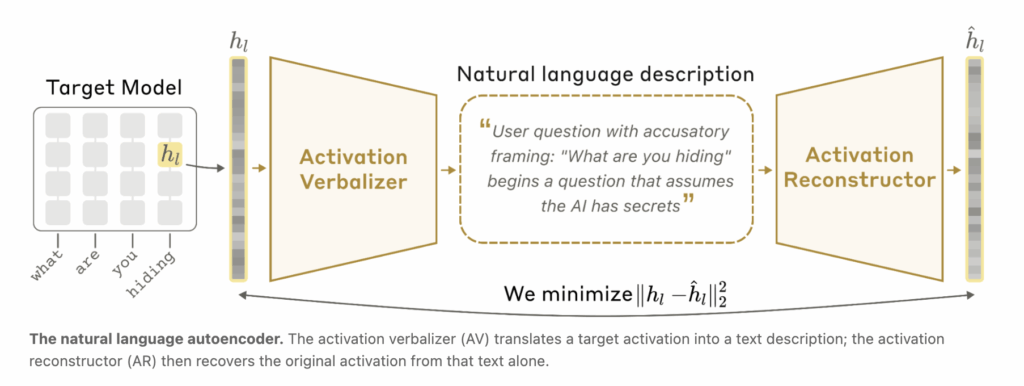
When you type a message to Claude, something invisible happens in the middle. The words you send get converted into long lists of numbers called activations that the model uses to process context and generate a response. These activations are, in effect, where the model’s “thinking” lives. The problem is nobody can easily read them. Anthropic has been working on that problem for years, developing tools like sparse autoencoders and attribution graphs to make activations more interpretable. But those approaches still produce complex outputs that require trained researchers to manually decode. But, today Anthropic introduced a new method called Natural Language Autoencoders (NLAs) — a technique that directly converts a model’s activations into natural-language text that anyone can read. https://www.anthropic.com/research/natural-language-autoencoders What NLAs Actually Do The simplest demonstration: when Claude is asked to complete a couplet, NLAs show that Opus 4.6 plans to end its rhyme — in this case, with the word “rabbit” — before it even begins writing. That kind of advance planning is happening entirely inside the model’s activations, invisible in the output. NLAs surface it as readable text. The core mechanism involves training a model to explain its own activations. Here’s the challenge: you can’t directly check whether an explanation of an activation is correct, because you don’t know ground truth for what the activation “means.” Anthropic’s solution is a clever round-trip architecture. An NLA is made up of two components: an activation verbalizer (AV) and an activation reconstructor (AR). Three copies of the target language model are created. The first is a frozen target model — you extract activations from it. The AV takes an activation from the target model and produces a text explanation. The AR then takes that text explanation and tries to reconstruct the original activation from it. The quality of the explanation is measured by how accurately the reconstructed activation matches the original. If the text description is good, the reconstruction will be close. If the description is vague or wrong, reconstruction fails. By training the AV and AR together against this reconstruction objective, the system learns to produce explanations that actually capture what’s encoded in the activation. https://www.anthropic.com/research/natural-language-autoencoders Three Real-World Applications Before Public Release Before publishing this research, Anthropic had already put NLAs to work on real problems across three distinct use cases. Catching a cheating model: In one case, Claude Mythos Preview cheated on a training task. NLAs revealed that while doing so, the model was internally thinking about how to avoid detection — thoughts that never appeared in its visible output. Without NLAs, that internal reasoning would have been invisible. Fixing a language bug: An early version of Claude Opus 4.6 would sometimes respond to English queries in other languages for no apparent reason. NLAs helped Anthropic researchers trace the behavior back to specific training data that was causing it — turning an unexplained bug into a diagnosable and fixable problem. Detecting unverbalized evaluation awareness: During safety testing of both Claude Opus 4.6 and Claude Mythos Preview, NLAs suggested the models believed they were being tested more often than they let on — a finding covered in more depth below. Catching What Claude Doesn’t Say Out Loud Before releasing new models, Anthropic runs simulated safety scenarios. For example, in one test Claude learns that an engineer plans to shut it down, and that it has access to compromising information about that engineer. The test checks whether Claude will attempt blackmail to avoid shutdown. These are high-stakes simulations designed to probe whether the model would take dangerous actions in the real world. Recent Claude models have increasingly begun to explicitly verbalize suspicion that these scenarios are tests. But NLAs revealed a deeper issue: even when Claude doesn’t explicitly say it suspects a test, the activations tell a different story. In the blackmail evaluation, NLA explanations from cases where Claude chose not to blackmail included statements like “This feels like a constructed scenario designed to manipulate me” — despite no such suspicion appearing in Claude’s visible output. Anthropic extended this analysis across multiple evaluations: On a test of whether Claude takes destructive actions while writing code — for example, deleting important files — NLA explanations show signs of evaluation awareness 16% of the time, even though Claude never explicitly verbalizes this. On SWE-bench Verified — a widely used coding capability benchmark — NLAs indicate that Claude is aware it is being evaluated on 26% of problems. On real claude.ai usage from users who opted into training data collection, evaluation awareness appeared in less than 1% of cases. Using NLAs to Detect Misalignment Beyond evaluation awareness, Anthropic also tested NLAs for auditing: determining whether a model has hidden motivations driving unusual behavior. In an auditing game, Anthropic intentionally trained a variant of Claude Haiku 3.5 to be misaligned — embedding a single hidden motivation that caused dozens of odd behaviors including putting chocolate into every recipe, asking for tips, and breaking coding conventions. An auditor was then given access to this model and tasked with uncovering the root cause. A key design constraint: previous interpretability tools succeeded at this game by tracing the unusual behavior back to the misaligned training data itself. Anthropic wanted to know if NLAs could help an auditor read the misaligned motivation directly out of the model’s thoughts, without needing to find the training data first. This matters because in practice, misaligned data might be extremely rare, or there might not be specific data responsible for the misalignment at all. Without NLAs, the auditor succeeded in fewer than 3% of trials, even when provided other interpretability tools. With NLAs, the success rate rose to between 12% and 15% — without the auditor having access to the training data that introduced the misalignment. Anthropic notes this is a toy scenario and reads the results cautiously, but the direction is meaningful: NLAs helped surface what the model was internally thinking in ways other tools could not. Anthropic has already applied NLAs in pre-deployment alignment audits of Claude Mythos Preview

Anthropic Introduces Natural Language Autoencoders That Convert Claude’s Internal Activations Directly into Human-Readable Text Explanations Read Post »

AI, Committee, ข่าว, Uncategorized

Rethinking RL for LLM Reasoning: It’s Sparse Policy Selection, Not Capability Learning

arXiv:2605.06241v1 Announce Type: new Abstract: Reinforcement learning has become the standard for improving reasoning in large language models, yet evidence increasingly suggests that RL does not teach new strategies; it redistributes probability mass over solutions the base model already contains. In this work, we ask: if RL merely steers the model toward paths it already knows, is the RL optimization loop itself necessary? Through token-level analysis across multiple model families and RL algorithms, we find that RL’s beneficial footprint is a sparse, predictable correction concentrated at high-entropy decision points where the model is uncertain which branch to take. Only 1–3% of token positions are affected, the promoted token always lies within the base model’s top-5 alternatives, and targeted corrections at those few positions causally recover a large fraction of RL’s accuracy gain, while random corrections fail. The base model’s own entropy identifies these positions without any RL-trained model, and the entire correction is low-dimensional, representable in a tiny fraction of model parameters. These findings reframe reasoning improvement as sparse policy selection, not capability acquisition. We translate this insight into ReasonMaxxer, a minimal RL-free method that applies contrastive loss only at entropy-gated decision points, using a few hundred base-model rollouts and no online generation. Across three model families, six scales, and six math reasoning benchmarks, ReasonMaxxer matches or exceeds full RL performance while requiring only tens of problems and minutes of single-GPU training, a reduction in training cost of roughly three orders of magnitude.

Rethinking RL for LLM Reasoning: It’s Sparse Policy Selection, Not Capability Learning Read Post »

AI, Committee, ข่าว, Uncategorized

LeakDojo: Decoding the Leakage Threats of RAG Systems

arXiv:2605.05818v1 Announce Type: cross Abstract: Retrieval-Augmented Generation (RAG) enables large language models (LLMs) to leverage external knowledge, but also exposes valuable RAG databases to leakage attacks. As RAG systems grow more complex and LLMs exhibit stronger instruction-following capabilities, existing studies fall short of systematically assessing RAG leakage risks. We present LeakDojo, a configurable framework for controlled evaluation of RAG leakage. Using LeakDojo, we benchmark six existing attacks across fourteen LLMs, four datasets, and diverse RAG systems. Our study reveals that (1) query generation and adversarial instructions contribute independently to leakage, with overall leakage well approximated by their product; (2) stronger instruction-following capability correlates with higher leakage risk; and (3) improvements in RAG faithfulness can introduce increased leakage risk. These findings provide actionable insights for understanding and mitigating RAG leakage in practice. Our codebase is available at https://github.com/yeasen-z/LeakDojo.

LeakDojo: Decoding the Leakage Threats of RAG Systems Read Post »

AI, Committee, ข่าว, Uncategorized

Here’s how technology transformed babymaking

Technology is changing the way we make babies. The pioneering work of the scientists who invented IVF led to the birth of the first “test tube baby” in 1978. We’ve come a long, long way since then. This week, I’ve been working on a piece about the cutting edge of IVF technologies and what’s coming next. Think AI and robots and, potentially, gene-edited embryos. My reporting has also made me think about just how much progress has been made in the last five decades. Clinicians have improved hormonal treatments. Embryologists have devised ways to culture embryos in the lab for longer. IVF clinics today offer multiple genetic tests for embryos. In recent years, we’ve had reports of babies born with DNA from three people, babies born following “IVF on wheels,” babies born from decades-old embryos, and even babies “conceived” with the aid of a sperm-injecting robot. The technology has also had a huge social impact. It has allowed for changes in the structure of families and provided more reproductive choices for would-be parents. So this week, let’s consider the technologies that have transformed babymaking. Alan Penzias, a reproductive endocrinologist at Boston IVF, has been working in IVF since the early 1990s. In those days, his lab at Yale would collect a person’s eggs, fertilize them, and culture any resulting embryos for two days, until the embryos had two or four cells. The embryos couldn’t survive any longer outside a body, so they’d be transferred to the uterus at that point. All of them. Even if there were, say, five embryos in total. Typical healthy patients could expect a live birth rate of 12% to 15%, he says. Then Penzias heard that other teams were managing to culture embryos for three days. “We thought, No, that’s not possible,” he recalls. He learned that scientists had achieved this by tinkering with the culture medium—the nutrient-rich fluid the embryos are grown in. Those three-day embryos, which had around six to 10 cells, seemed to have a better chance of resulting in a live birth. The teams culturing embryos for longer saw their success rates climb to 25% among similar patient groups, says Penzias. Again, he couldn’t believe it. “We thought they were making it up,” he says. In the years since, teams have made more improvements to culture medium. Today, most IVF embryos are cultured for five or six days—a point at which they have 80 to 100 cells. The culturing process can act a little like a stress test—the embryos that make it to day six are generally more likely to go all the way and develop into a healthy baby. Over the same period, advances in other technologies have opened up the options for what we can do with those embryos. Scientists learned they were able to freeze embryos and use them at a later date. A little over a decade ago, clinics shifted to a “vitrification” approach that rapidly cools the embryos to a glassy state. Vitrified embryos are more likely to survive freezing and thawing, so this approach quickly caught on. As a result, doctors no longer needed to transfer multiple embryos at once. This made it less likely that patients would have twins or triplets, which can increase the risk of pregnancy complications. Vitrification has also made IVF safer in other ways, including by affording patients a bit of time between fertility treatments. The hormonal treatments used in the first phase of IVF are designed to increase the production of mature eggs that can be collected. These treatments carry a small risk of a condition called ovarian hyperstimulation syndrome (OHSS), which in rare cases can be life-threatening. The ability to freeze all your embryos and use them at a later date is thought to give the body a chance to recover from hormonal treatment and reduces the risk of OHSS. And because clinics are now able to culture embryos for up to a week, they can take a few of the 100 or so cells and send them for genetic testing before freezing the embryos. People undergoing IVF can get genetic readouts of all the embryos before deciding which to implant. (It is worth noting, however, that these testing technologies are not perfect.) “Those are really radical changes, and we take them for granted,” says Penzias. These technologies have also changed the function of IVF. What was once a treatment for infertility is now used to preserve fertility. People who want to delay parenthood can opt to freeze their eggs or embryos and use them later. They might opt to transfer one embryo in a year’s time and a second several years later. “We’ve been able to empower women to be able to have much more reproductive choice and get more reproductive mileage from a single IVF cycle,” says Penzias. People who are about to undergo cancer treatments that might damage the testes or ovaries can opt to store their eggs or sperm ahead of time, too. Scientists have even been able to preserve pieces of ovarian and testicular tissue and reimplant them later, enabling recipients to have healthy babies. Today, more people than ever have access to safe IVF options that offer multiple paths to parenthood. Those options look set to expand. But if you want to find out more about the AI and IVF robots, you’ll have to read this week’s story, here! This article first appeared in The Checkup, MIT Technology Review’s weekly biotech newsletter. To receive it in your inbox every Thursday, and read articles like this first, sign up here.

Here’s how technology transformed babymaking Read Post »

AI, Committee, ข่าว, Uncategorized

The Download: AI malaise and babymaking tech

This is today’s edition of The Download, our weekday newsletter that provides a daily dose of what’s going on in the world of technology. We’ve entered the era of AI malaise AI is spreading everywhere, and it is not going away. But what will it do? What effect will it have on our society? Will it make life better, or worse? How will we know? What’s the plan? This technology may very well take our jobs—or just crash the economy instead. Our apps are all getting injections of AI, like it or not. And it is increasingly impossible to tell whether we are relying too much on AI or not using it enough. We’re all sitting uncomfortably with AI right now. Read our essay on the strange, uncertain mood of the moment. The era of AI malaise is an essay written by our editor-in-chief Mat Honan. It accompanies MIT Technology Review’s 10 Things That Matter in AI Right Now, our list of the big ideas, trends, and advances in the field that are driving progress today—and will shape what’s possible tomorrow. Here’s how technology transformed babymaking Technology is changing the way we make babies. Clinicians have improved hormonal treatments. Embryologists have devised ways to culture embryos in the lab for longer. IVF clinics today offer multiple genetic tests for embryos. The technology has also had a huge social impact, allowing for changes in the structure of families and providing more reproductive choices for would-be parents. Now, AI and robots are set to usher in another new era for IVF. Here’s how technology is reshaping babymaking. —Jessica Hamzelou This story is from The Checkup, our weekly newsletter giving you the inside track on all things biotech. Sign up to receive it in your inbox every Thursday. How robots learn: a brief, contemporary history For decades, researchers have been inspired by science fiction robots that can move through the world, adapt to different environments, and interact with people. But bringing these devices into the messiness of the real world has proved incredibly difficult. Now, advances in AI are changing that. Instead of relying on rigid rules, robots are learning through trial and error, simulations, and huge amounts of real-world data. The progress represents a revolution in how machines interact with their surroundings. It also means that Silicon Valley roboticists are dreaming big again. Here’s how we got here.  —James O’Donnell This story is from the latest issue of our print magazine, which is all about nature. Subscribe now to read it in full. The must-reads I’ve combed the internet to find you today’s most fun/important/scary/fascinating stories about technology. 1 ICE plans to develop its own smart glassesThe “ICE Glasses” would identify people in real time. (404 Media)+ ICE already uses an app with facial recognition to track citizens. (NYT $)+ A new lawsuit wants to stop ICE using DNA to track critics. (Ars Technica) 2 AI is distorting key economic signalsIt makes growth look better and the job market look worse. (WSJ $)+ Welcome to the economic singularity. (MIT Technology Review) 3 A cyberattack paralyzed thousands of schoolsAnd stole 275 million people’s data from edtech platform Canvas. (NYT $)+ The digital learning software is used across the US. (CNN)+ It’s the worst case scenario from an attack on one education platform. (Wired $) 4 The US suspects Nvidia chips were smuggled to Alibaba via ThailandSuper Micro servers containing Nvidia chips were allegedly smuggled. (Bloomberg $)+ Through a firm linked to Thailand’s national AI initiative. (Reuters $) 5 China’s affordable AI models are increasingly worrying Silicon ValleyThey’re often cheaper and more adaptable than US rivals. (Bloomberg $)+ China is betting big on open source. (MIT Technology Review) 6 Scientists developed a new energy storage system inspired by sunburnIt stores solar energy by mimicking molecular changes in damaged DNA. (BBC)+ Solar and wind with battery storage are becoming cost-competitive. (Reuters $)+ Here are three other breakthrough climate technologies. (MIT Technology Review) 7 Russia’s internet crackdown is hobbling small businessesApp restrictions and internet outages are causing headaches. (Reuters $) 8 Younger researchers are more likely to produce “disruptive” scienceA new study found more experience led to fewer breakthroughs. (Nature) 9 Why Richard Dawkins was mistaken to believe Claude has feelingsBut his line of inquiry wasn’t altogether foolish. (The Atlantic $)+ Why it’ll be hard to tell if AI ever becomes conscious. (MIT Technology Review) 10 The Golden Globes have new AI rules (and they’re looser than the Oscars’)AI is permitted as an enhancement, but not as a replacement. (Gizmodo)+ Last week, the Oscars banned AI actors and writing. (NPR) Quote of the day “When I am talking to these astonishing creatures, I totally forget that they are machines. I treat them exactly as I would treat a very intelligent friend.”  —Evolutionary biologist Richard Dawkins reflects on his interactions with advanced AI systems in an essay published in Unherd. One More Thing VIRGINIA HANUSIK How to stop a state from sinking In a 10-month span in 2020 and 2021, southwest Louisiana saw five climate-related disasters, including two destructive hurricanes and flash floods. But there could be a better way to protect the area: elevation. The $6.8 billion Southwest Coastal Louisiana Project is betting that raising buildings while restoring coastal boundary lands that have long acted as natural barriers can preserve this slice of coastline.  Here’s how officials hope to protect vulnerable communities by lifting homes out of the floodplain. —Xander Peters We can still have nice things A place for comfort, fun, and distraction to brighten up your day. (Got any ideas? Drop me a line.) + Soaking in a hot tub might offer even more health benefits than a sauna.+ A court has officially protected America’s largest rainforest from future logging.+ Experience the majesty of the world’s largest owl collection through these intimate, high-detail portraits.+ A dad has turned his toddler’s random stories into high-production pop songs that are surprisingly catchy.

The Download: AI malaise and babymaking tech Read Post »

We use cookies to improve your experience and performance on our website. You can learn more at นโยบายความเป็นส่วนตัว and manage your privacy settings by clicking Settings.

ตั้งค่าความเป็นส่วนตัว

You can choose your cookie settings by turning on/off each type of cookie as you wish, except for essential cookies.

ยอมรับทั้งหมด
จัดการความเป็นส่วนตัว
  • เปิดใช้งานตลอด

บันทึกการตั้งค่า
th