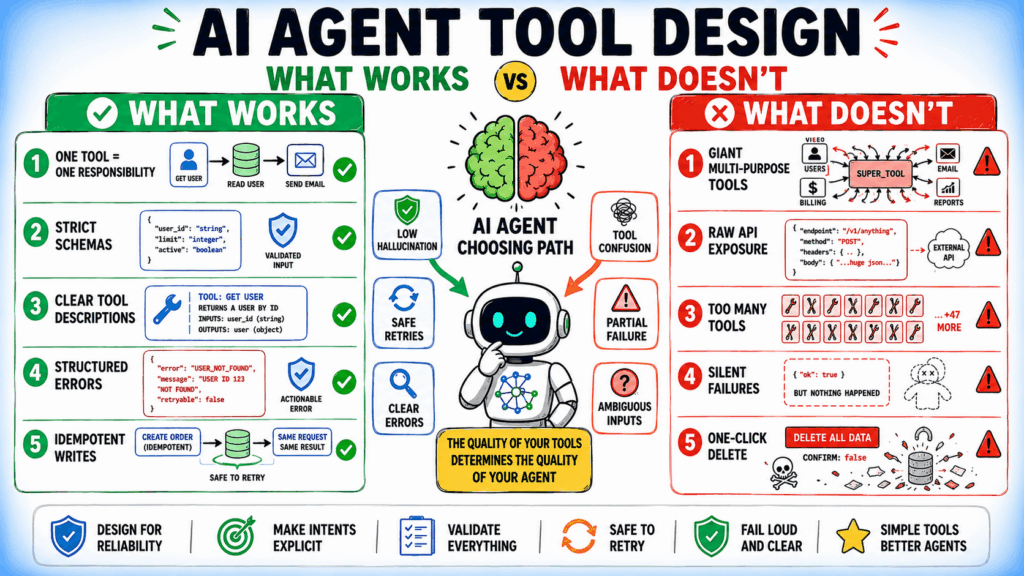
AI Agent Tool Design: What Works and What Doesn’t
Most
AI Agent Tool Design: What Works and What Doesn’t Leggi l'articolo »


This is today’s edition of The Download, our weekday newsletter that provides a daily dose of what’s going on in the world of technology. These new solid-state ACs promise a cool future. Scientists aren’t so sure. After three years of record-breaking heat and another scorcher underway, air-conditioning isn’t going anywhere. That’s good for our health, but bad for the planet: it already accounts for 7% of global electricity use and 3% of greenhouse-gas emissions. Feeling the heat, scientists and startups are hoping to amp up solid-state cooling. These systems move heat through conductive materials, which could cool spaces and surfaces with fewer messy side effects. The catch is whether it can match the efficiency of traditional AC. Find out how the unconventional coolers aim to dial down AC emissions. —Sara Kiley Watson This story is from the next edition of our magazine, which is all about engineering. Subscribe now to get a copy when it lands! Job titles of the future: nature’s drug designer In 2018, after nearly two decades working in Big Pharma, chemist Tim Cernak was ready to put his skills to a new use. As a lifelong nature lover, he had become concerned that animals are often treated with human pharmaceuticals that can be harmful or even lethal. He decided to address this with a new approach: “conservation chemistry.” Using AI tools and robots, he’s now rapidly designing and testing drugs for animals. Here’s what it takes to treat nature’s patients. —Anna Gibbs The must-reads I’ve combed the internet to find you today’s most fun/important/scary/fascinating stories about technology. 1 Anthropic has shut down access to its top models after a US directiveThe US barred foreigners from using Fable 5 and Mythos 5 on Friday. (NYT $)+ Anthropic disabled access globally as it can’t filter users in real time.(BBC)+ Talks with Amazon’s CEO apparently prompted the ban. (WSJ $)+ Cybersecurity experts have called for the ban to end. (Axios)+ But the White House’s war against Anthropic has previously backfired. (MIT Technology Review) 2 The UK is banning social media for under-16sDetails are scant, but the measure is due to take effect in early 2027. (The Guardian)+ The ban covers Snapchat, TikTok, YouTube, Instagram, Facebook, and X. (BBC)+ Many countries are curbing children’s social media access. (Reuters $) 3 New space data suggests black holes formed before galaxiesIt could resolve cosmology’s chicken-and-egg dilemma. (New Scientist $)+ Odd tricks have formed a massive black hole. (MIT Technology Review) 4 Skepticism around AI layoffs is increasingThere are growing doubts that AI is really the culprit. (TechCrunch)+ We need a reality check on AI jobs hysteria. (MIT Technology Review) 5 A coalition of states has opened an investigation into OpenAIOver matters including user data, child safety and advertising. (NYT $) 6 Tesla has been accused of misleading regulators over “full self-driving”By exaggerating its safety statistics. (Reuters $) 7 NASA’s “quiet supersonic” plane has hit critical new milestonesThe X-59 reached 924 mph and 55,000 feet. (Scientific American) + Which are essential for flying over populated areas. (Engadget)+ It’s designed to take the boom out of supersonic travel. (BBC) 8 Deepfakes are getting harder to spot—and weirder—in the midtermsThanks to improvements in free AI tools. (WSJ $) 9 AI is revealing the secret lives of animalsBy tracing their movements, landmarks, and social practices. (Nature) 10 Where did Earth get its oceans? Maybe it made them itself.Scientists now suspect that Earth’s waters are homegrown. (Quanta) Quote of the day “This action has taken the best models away from defenders, created market uncertainty, and risked America’s AI leadership without any real risk to justify it.” —Cybersecurity leaders urge the Trump administration to reverse restrictions on Anthropic’s most advanced AI models in an open letter. One More Thing CHRISTIE HEMM KLOK How scientists want to make you young again A little over 15 years ago, scientists at Kyoto University made a remarkable discovery. When they added just four proteins to a skin cell and waited about two weeks, some of the cells underwent an unexpected and astounding transformation: they became young again. Now, after more than a decade of developing this cellular reprogramming, biotech companies and research labs have tantalising hints that the process could be the gateway to an unprecedented new technology for human age reversal. Read the full story on their efforts to “reprogram” aging bodies back to youth. —Antonio Regalado We can still have nice things A place for comfort, fun, and distraction to brighten up your day. (Got any ideas? Drop me a line.) + Evolutionary biologists may have figured out why the T-Rex had such tiny arms.+ This beautifully sustainable bento box design is engineered to eliminate single-use takeout waste.+ Search across 5.8 million museum artworks spanning from 3000 BC to today at The Last Museum.+ Here’s a sharp cosmic snapshot of Thor’s Helmet, an interstellar gas bubble sitting 15,000 light-years away.
The Download: cutting AC emissions, and nature’s drug designer Leggi l'articolo »
Casey Harrell has had a set of electrodes embedded in his brain for almost three years. Harrell, who has amyotrophic lateral sclerosis (ALS) and is paralyzed, first used his brain-computer interface (BCI) to “speak” sentences with the help of a research team in 2023. Since then, Harrell has clocked thousands of hours of use. He can use the device largely independently, once he’s been “plugged in” with the help of a carer. His team has added new features to it, and Harrell also uses it to surf the web and perform his job. “Living with a disease like ALS, you are supposed to have diminished dreams. I do not,” Harrell tells MIT Technology Review. “Any one of these things would be an absolute godsend of improvement. To have all of them, and many, many more, is truly revolutionary.” Within the first 22.6 months after the device was implanted, Harrell had used it for more than 3,800 hours at home without any researchers present, the team reported today in the journal Nature Medicine. “He’s the first power user of a speech BCI,” says team member Sergey Stavisky, a neuroengineer at the University of California, Davis. Decoding speech Three years ago, Harrell entrusted David Brandman, an associate professor of neurological surgery at the University of California, Davis, and his colleagues with his brain. Harrell, who was 45 at the time, had already been diagnosed with ALS, a degenerative disease that robs people of the use of their muscles. Harrell was dependent on others to control his wheelchair and to dress and feed him. He had difficulty speaking; people struggled to understand what he was saying. Then Brandman and his colleagues asked if he’d like to trial a brain implant that might help him communicate. “The industry was [on the] cusp of a transformation, and I wanted to be part of it,” says Harrell. He signed up. In July 2023, during a five-hour operation, doctors implanted four arrays of 64 electrodes each into his brain. Each pair of arrays was wired to a “pedestal” connection point—creating two docking locations on the exterior of his skull to connect the electrodes to a computer. The team had long been working on developing algorithms to decode brain activity into speech. Their system works by recording activity from the speech motor cortex—a region of the brain responsible for the movements that allow us to speak. “There are 39 phonemes that make up all the sounds in the [American] English language,” says Nicholas Card, a neuroengineer at UC Davis and member of the team. Mapping neural activity related to producing each of those phonemes can allow the team to create a personalized speech decoder and software that can “speak” those words. “We first go from brain data to phonemes, and then from phonemes to words,” he says. They started using the device around a month after the surgery. The team got Harrell’s speech decoder working on the first day, says Card. On that day in August, Harrell used the device to speak with a 50-word vocabulary, and 99.6% of the words were as he’d intended. That vocabulary was later expanded to 125,000 words with 97.5% accuracy. At the time, it was unclear how long the device might last. Brain-computer interfaces are still new—not many people have had them implanted for long periods of time. Scar tissue can form around electrodes in a person’s brain, interfering with their ability to pick up neural activity, for example. But that doesn’t seem to be the case for Harrell. Power user In another advance, Harrell is now able to use the device more independently. In 2023, members of the research team would have to visit Harrell at his home and physically connect and disconnect him from the device on the days he wanted to use it. Not anymore. The team has since automated more of the system—today, Harrell’s care partner can don and doff it for him. “He’ll wake up, get plugged in, and just get going,” says Stavisky. This is important, says Mariska Vansteesel, a BCI researcher at Utrecht Medical Center who was not involved in the trial. “For these technologies to be relevant for patients, we really need to test them in settings in which they will eventually be used … to demonstrate that it has value, that it’s usable, and that it functions well without the constant involvement of a research team,” she says. Casey Harrell uses his BCI to speak in “private mode.” The team has also worked to improve the system itself. It is now 99% accurate, says Stavisky. Harrell can also control a cursor—a game changer that enables him to use his personal computer to send text messages and emails, surf the web, and keep up with his job as an environmental activist. Over the years, the team has updated the system to accommodate specific requests from Harrell. He is now able to switch on a “privacy mode”—when active, any decoded text will be automatically deleted. He can also opt to use a “profanity filter” while he’s talking to his young daughter. “We have been able to add on to the software side of the device … improving the accuracy and adding more bells and whistles to enable me to be more independent when using the device,” says Harrell. “We are making the road as we walk it, or roll it, so to speak.” Nothing short of revolutionary Vansteesel cautions that while the device is working well for Harrell, there’s no guarantee it will work as well, or as long, for other people with ALS. Over the last decade, she has worked with a woman with ALS who used a fully implanted device to communicate using “brain clicks”—cursor clicks made using brain activity. The woman used her BCI for seven years, but it stopped working toward the end of that period, apparently due to brain degeneration. At any rate, not everyone with ALS will be willing to undergo invasive brain surgery, says Jane Huggins, who
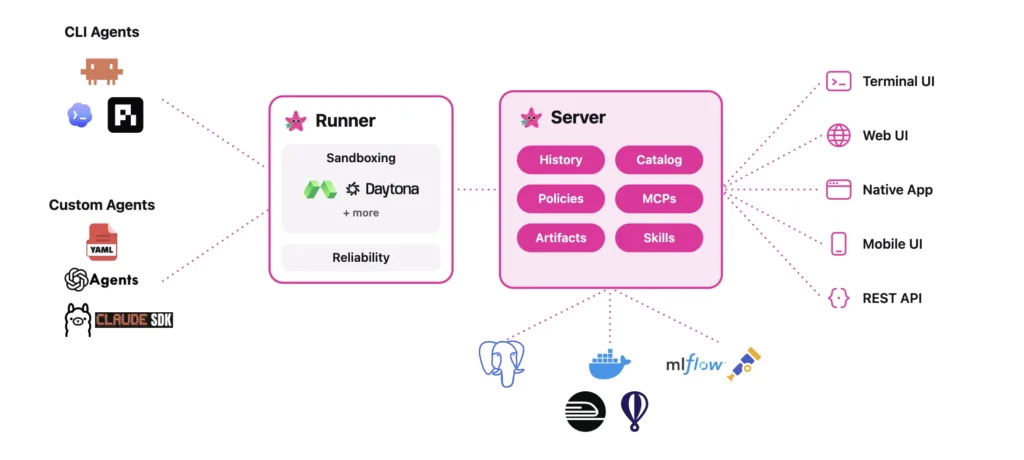
Databricks released Omnigent, an open source ‘meta-harness’ for AI agents. The project ships under the Apache 2.0 license. The Databricks AI team built it with Neon. A harness is the wrapper around a model that turns it into an agent. Claude Code, Codex, and Pi are harnesses. Omnigent sits one level above them. It treats each harness as an interchangeable part of a larger system. Many engineers now juggle four or five agents at once. They copy text between coding agents, search tools, Docs, and Slack. Each harness only understands its own sessions. Omnigent adds a shared layer where composition, control, and collaboration live. What is Omnigent Omnigent is a common interface above command-line agents and agent SDKs. It wraps terminal coding agents such as Claude Code, Codex, and Pi. It also wraps SDKs like OpenAI Agents and the Claude Agents SDK. The design rests on one observation. However a harness calls its model internally, the user-facing interface is the same. Messages and files go in. Text streams and tool calls come out. Omnigent standardizes that interface so harnesses become swappable. You supply the models and the infrastructure. Omnigent runs the agents on top. It can coordinate several of them as interchangeable workers under one orchestrator. How Omnigent Works The architecture has two parts. A runner wraps any agent in a sandboxed session with a uniform API. A server provides policies and sharing. The server exposes every session over the terminal, the app, and web APIs. One command starts a session in your terminal. It also launches a local web UI at localhost:6767. The same session appears in the browser or on a phone. Messages, sub-agents, terminals, and files stay in sync. The CLI installs under two names, omnigent and omni. They are interchangeable. On first run, it detects model credentials already in your environment. https://omnigent.ai/ Composition, Control, and Collaboration Databricks team frames Omnigent around three capabilities: Composition means combining models, harnesses, and techniques without rewriting code. You switch between Claude Code, Codex, Pi, and custom agents with one-line changes. Control means stateful, contextual policies. They track agent actions and enforce guardrails at the meta-harness layer, not through prompts. One example pauses an agent after every $100 it spends. Another requires human approval to git push once the agent installs a new npm package. Collaboration means sharing live agent sessions by URL. Teammates watch the agent work and chat with it in real time. They can comment on files, co-drive the session, or fork the conversation. An OS sandbox, called Omnibox, underpins this. It can lock down OS access and transform network requests. For instance, it can keep your GitHub token hidden from the agent. The token is injected only in the egress proxy on approved requests. Use Cases and Examples Two example agents ship with the repository: Polly is a multi-agent coding orchestrator. It writes no code itself. It plans, then delegates work to coding sub-agents in parallel git worktrees. Each diff routes to a reviewer from a different vendor than the writer. You merge the result. Debby is a brainstorming partner with two heads. One head is Claude, the other GPT. Every question goes to both, with answers shown side by side. Type /debate and the heads critique each other before converging. Other practical patterns follow the same shape. A frontier advisor model can guide a cheaper open-source worker. A lead agent can orchestrate parallel subagents. Different LLMs can handle planning, search, and code generation in one flow. Interactive Concept Demo Marktechpost team has created a interactive demo (below) that lets you experience Omnigent’s meta-harness workflow firsthand. You pick a task for the Polly orchestrator, which plans it and delegates to three sub-agents: Claude Code, Codex, and Pi that are running in parallel and streaming their steps live. A session cost meter ticks up as they work, and the two policy toggles show Omnigent’s control layer in action: the cost budget pauses the run at $3.00 for your approval, and a contextual policy halts a git push that follows an npm install until you allow it. Once the sub-agents finish, each diff is cross-reviewed by a different vendor than the one that wrote it, then marked ready to merge. Terminal, Web, and Mobile tabs show the same session staying in sync across interfaces. It’s an illustrative simulation, no live models are called. ◇ Omnigent Meta-Harness One orchestrator. Many harnesses. One governed session. Interactive concept demo 1 · Pick a task for the orchestrator (Polly) Build REST endpoint + tests Refactor auth module Add caching layer 2 · Policies (control layer) Cost budget — pause at $3.00 Approve git push after npm install Run session ⌘ Terminal ▤ Web UI ▢ Mobile same session · in sync Session LLM cost $0.00 Orchestrator · Polly (writes no code; plans & delegates) Idle. Pick a task and press “Run session”. Claude Codewaiting Codexwaiting Piwaiting ✓ Ready to merge. 3 diffs cross-reviewed by a different vendor than the writer. Illustrative simulation of the Omnigent workflow — no live models are called. Learn more at omnigent.ai · GitHub · Apache 2.0 · Alpha. Marktechpost · AI Dev & Research Media Policy paused the session Reason goes here. Deny / stop Approve & continue ◇ Omnigent Meta-Harness One orchestrator. Many harnesses. One governed session. Interactive concept demo 1 · Pick a task for the orchestrator (Polly) Build REST endpoint + tests Refactor auth module Add caching layer 2 · Policies (control layer) Cost budget — pause at $3.00 Approve git push after npm install Run session ⌘ Terminal ▤ Web UI ▢ Mobile same session · in sync Session LLM cost $0.00 Orchestrator · Polly (writes no code; plans & delegates) Idle. Pick a task and press “Run session”. Claude Codewaiting Codexwaiting Piwaiting ✓ Ready to merge. 3 diffs cross-reviewed by a different vendor than the writer. Illustrative simulation of the Omnigent workflow — no live models are called. Learn more at omnigent.ai · GitHub · Apache 2.0 · Alpha. Marktechpost · AI
This week, Moonshot AI released Kimi K2.7-Code. It is a coding-focused, agentic model. The model weights ship on Hugging Face under a Modified MIT license. You can also reach it through the Kimi API and Kimi Code. K2.7-Code targets long-horizon software engineering, not general chat. It plans, edits, runs tools, and debugs across many steps. Moonshot pairs the model with a subscription coding platform around it. Kimi K2.7-Code K2.7-Code is a Mixture-of-Experts model. It holds 1T total parameters and activates 32B per token. The design uses 384 experts, with 8 selected per token and 1 shared. It has 61 layers, including 1 dense layer. Attention uses MLA, and the feed-forward path uses SwiGLU. A MoonViT vision encoder adds 400M parameters for image and video input. The model ships with native INT4 quantization. The context window is 256K tokens (262,144). Two constraints matters: Thinking mode is mandatory; disabling it returns an API error. Sampling is fixed: temperature 1.0, top_p 0.95, n 1, penalties 0.0. Default max output is 32,768 tokens. You can self-host with vLLM, SGLang, or KTransformers. The Hugging Face repository is large, roughly 595 GB on disk. This is a server-class deployment target, not a laptop model. Benchmark Moonshot team published six benchmark rows. They compare K2.7-Code against K2.6, GPT-5.5, and Claude Opus 4.8. K2.7-Code beats K2.6 on every row. The largest coding jump is Kimi Code Bench v2, from 50.9 to 62.0. Benchmark Kimi K2.6 Kimi K2.7-Code GPT-5.5 Claude Opus 4.8 K2.7 vs K2.6 Kimi Code Bench v2 50.9 62.0 69.0 67.4 +21.8% Program Bench 48.3 53.6 69.1 63.8 +11.0% MLS Bench Lite 26.7 35.1 35.5 42.8 +31.5% Kimi Claw 24/7 Bench 42.9 46.9 52.8 50.4 +9.3% MCP Atlas 69.4 76.0 79.4 81.3 +9.5% MCP Mark Verified 72.8 81.1 92.9 76.4 +11.4% K2.7-Code does beat Opus 4.8 on MCP Mark Verified, 81.1 versus 76.4. It also lands close to GPT-5.5 on MLS Bench Lite. K2.7-Code ran in Kimi Code CLI, GPT-5.5 in Codex xhigh, and Opus 4.8 in Claude Code xhigh. Reasoning-Token Efficiency: A Cost Claim, Not Just Quality Moonshot team reports about 30% lower reasoning-token usage than K2.6. It frames this as ‘less overthinking.’ Reasoning tokens bill as output tokens on most price cards. Agentic coding runs hundreds or thousands of steps. Each plan, retry, and verification pays the thinking cost again. A 30% cut compounds across a long run. The effect lands in three places at once. First, lower output-token cost per task. Second, faster steps, which helps interactive CLI sessions. Third, more steps before hitting context limits. Use Cases With Examples Repo-scale refactors are the main use case. Point the agent at a failing test suite. It reads files, edits across modules, then reruns tests until green. Code review is a second fit. Feed a pull request diff and ask for risk analysis. The 256K window holds large diffs, logs, and related files together. MCP tool-use workflows are a third fit. K2.7-Code scored 81.1 on MCP Mark Verified. That suite tests correct tool invocation through the Model Context Protocol. Think CI checks, ticket updates, and file edits in one loop. Long-context analysis is a fourth fit. The model accepts text, image, and video input. Documentation, screenshots, and a recorded repro can share one prompt. Marktechpost’s Interactive Explorer Kimi K2.7-Code — Interactive Explorer Company-reported benchmarks and official API pricing. Released June 12, 2026. Verified June 12, 2026. Benchmarks Cost Calculator Specs Source: Moonshot AI Kimi K2.7-Code model card. K2.7-Code ran in Kimi Code CLI; GPT-5.5 in Codex xhigh; Claude Opus 4.8 in Claude Code xhigh. First-party numbers, not an independent leaderboard. Input tokens / run: 50,000 Output tokens / run: 8,000 Cache hit rate: 50% Runs / month: 1,000 Reasoning share of output: 40% Input cost$0.00 Output cost$0.00 Est. monthly total$0.00 $0.00 Rates: cached input $0.19 / 1M, cache-miss input $0.95 / 1M, output $4.00 / 1M (official Kimi pricing). Savings line illustrates K2.7-Code’s reported ~30% lower reasoning-token usage vs K2.6, applied to the reasoning share of output. Estimate only. Source: Kimi K2.7-Code Hugging Face model card and Kimi API docs. ‘; models.forEach(function(m){ h+=’ ‘ +’ ‘+m.name+’ ‘ +’ ‘; }); wrap.innerHTML=h;charts.appendChild(wrap); }); function renderBars(){ benches.forEach(function(b,i){ models.forEach(function(m){ var el=root.querySelector(‘#f-‘+i+’-‘+m.key); var parent=el.closest(‘.k27-row’); if(!active[m.key]){parent.style.display=’none’;el.style.width=’0′;return;} parent.style.display=’flex’; el.style.width=b[m.key]+’%’; el.textContent=b[m.key].toFixed(1); }); }); } setTimeout(renderBars,60); // —- specs —- var sp=root.querySelector(‘#k27-specs’); specs.forEach(function(s){ var d=document.createElement(‘div’);d.className=’k27-spec’; d.innerHTML=’ ‘+s[0]+’ ‘+s[1]+’ ‘; sp.appendChild(d); }); // —- calculator —- var R_CACHE=0.19, R_MISS=0.95, R_OUT=4.00; // per 1M tokens function fmt(n){return ‘$’+n.toLocaleString(‘en-US’,{minimumFractionDigits:2,maximumFractionDigits:2});} function comma(n){return n.toLocaleString(‘en-US’);} var I={inp:root.querySelector(‘#k27-in’),out:root.querySelector(‘#k27-out’), cache:root.querySelector(‘#k27-cache’),runs:root.querySelector(‘#k27-runs’), think:root.querySelector(‘#k27-think’)}; function calc(){ var inp=+I.inp.value, out=+I.out.value, cache=+I.cache.value/100, runs=+I.runs.value, think=+I.think.value/100; root.querySelector(‘#k27-in-v’).textContent=comma(inp); root.querySelector(‘#k27-out-v’).textContent=comma(out); root.querySelector(‘#k27-cache-v’).textContent=(cache*100).toFixed(0)+’%’; root.querySelector(‘#k27-runs-v’).textContent=comma(runs); root.querySelector(‘#k27-think-v’).textContent=(think*100).toFixed(0)+’%’; var inRate=cache*R_CACHE+(1-cache)*R_MISS; var inCost=runs*inp*inRate/1e6; var outCost=runs*out*R_OUT/1e6; var total=inCost+outCost; // illustrative 30% reasoning-token reduction on the reasoning share of output var reasonOut=out*think; var saved=runs*(reasonOut*0.30)*R_OUT/1e6; root.querySelector(‘#k27-r-in’).textContent=fmt(inCost); root.querySelector(‘#k27-r-out’).textContent=fmt(outCost); root.querySelector(‘#k27-r-total’).textContent=fmt(total); root.querySelector(‘#k27-r-big’).textContent=fmt(total)+’ /mo’; root.querySelector(‘#k27-r-save’).innerHTML= ‘≈ ‘+fmt(saved)+’/mo saved vs K2.6-style reasoning, from ~30% fewer reasoning tokens.’; } Object.keys(I).forEach(function(k){I[k].addEventListener(‘input’,calc);}); calc(); })();
In this tutorial, we build an end-to-end spatial graph learning pipeline using city2graph. We start by collecting real urban POI data and street network information from OpenStreetMap, with a synthetic fallback to ensure the workflow remains reliable. We then engineer spatial features, construct multiple proximity graph families, and compare how different graph-building strategies represent the same urban environment. After that, we create both heterogeneous and homogeneous graph structures, convert them into PyTorch Geometric format, and train a GraphSAGE model to predict POI categories from spatial structure. Through this process, we integrate geospatial data processing, graph construction, and GNN-based urban function inference into a single practical workflow. Installing city2graph and Importing Geospatial and Graph Learning Libraries Copy CodeCopiedUse a different Browser !pip -q install “city2graph[cpu]” osmnx contextily scikit-learn 2>/dev/null import warnings, numpy as np, pandas as pd, geopandas as gpd warnings.filterwarnings(“ignore”) from shapely.geometry import Point import matplotlib.pyplot as plt import city2graph as c2g print(“city2graph version:”, getattr(c2g, “__version__”, “unknown”)) print(“PyTorch / PyG available:”, c2g.is_torch_available()) import torch import torch.nn.functional as F from torch_geometric.nn import SAGEConv, to_hetero from torch_geometric.utils import to_undirected from sklearn.preprocessing import StandardScaler from sklearn.neighbors import NearestNeighbors from sklearn.metrics import accuracy_score, f1_score from sklearn.decomposition import PCA SEED = 42 np.random.seed(SEED); torch.manual_seed(SEED) We begin by installing the required libraries and importing the geospatial, graph learning, and machine learning tools used throughout the tutorial. We verify that city2graph and PyTorch Geometric are available so the rest of the workflow can run properly. We also set a fixed random seed to make the graph construction, training split, and model results more reproducible. Collecting OpenStreetMap POI Data with a Synthetic Fallback Copy CodeCopiedUse a different Browser CENTER = (35.6595, 139.7005) DIST_M = 1100 TAG_QUERIES = { “food”: {“amenity”: [“restaurant”, “cafe”, “fast_food”, “bar”, “pub”]}, “retail”: {“shop”: True}, “education”: {“amenity”: [“school”, “university”, “college”, “kindergarten”, “library”]}, “health”: {“amenity”: [“hospital”, “clinic”, “pharmacy”, “doctors”, “dentist”]}, } def to_points(gdf): g = gdf.copy() g[“geometry”] = g.geometry.representative_point() return g poi_gdf, segments_gdf = None, None try: import osmnx as ox ox.settings.use_cache = True ox.settings.log_console = False frames = [] for label, tags in TAG_QUERIES.items(): try: f = ox.features_from_point(CENTER, tags=tags, dist=DIST_M) f = f[f.geometry.notna()] if len(f): f = to_points(f)[[“geometry”]].copy() f[“category”] = label frames.append(f) except Exception as e: print(f” (skip {label}: {e})”) if not frames: raise RuntimeError(“No POIs returned from Overpass.”) poi_gdf = gpd.GeoDataFrame(pd.concat(frames, ignore_index=True), crs=”EPSG:4326″) G = ox.graph_from_point(CENTER, dist=DIST_M, network_type=”walk”) segments_gdf = ox.graph_to_gdfs(G, nodes=False, edges=True).reset_index(drop=True)[[“geometry”]] print(f”OSM acquisition OK -> {len(poi_gdf)} POIs, {len(segments_gdf)} street segments”) except Exception as e: print(f”OSM unavailable ({e}) -> generating synthetic clustered POIs.”) rng = np.random.default_rng(SEED) cats = list(TAG_QUERIES.keys()) centers = rng.uniform(-0.01, 0.01, size=(8, 2)) + np.array(CENTER[::-1]) rows = [] for ci, c in enumerate(centers): dom = cats[ci % len(cats)] n = rng.integers(40, 90) pts = c + rng.normal(0, 0.0016, size=(n, 2)) for (lon, lat) in pts: cat = dom if rng.random() < 0.75 else rng.choice(cats) rows.append({“geometry”: Point(lon, lat), “category”: cat}) poi_gdf = gpd.GeoDataFrame(rows, crs=”EPSG:4326″) segments_gdf = None print(f”Synthetic dataset -> {len(poi_gdf)} POIs”) if len(poi_gdf) > 700: poi_gdf = poi_gdf.sample(700, random_state=SEED).reset_index(drop=True) metric_crs = poi_gdf.estimate_utm_crs() poi_gdf = poi_gdf.to_crs(metric_crs).reset_index(drop=True) if segments_gdf is not None: segments_gdf = segments_gdf.to_crs(metric_crs) print(“Class balance:n”, poi_gdf[“category”].value_counts()) We collect real POI data from OpenStreetMap around Shibuya, Tokyo, and group the locations into broad urban function categories such as food, retail, education, and health. We also download the walkable street network so that the POIs can later be connected with urban-form features. If the OSM request fails, we generate a synthetic clustered dataset, which keeps the tutorial runnable even when online data access is unavailable. Engineering Spatial Features and Building Proximity Graph Families Copy CodeCopiedUse a different Browser poi_gdf[“cx”] = poi_gdf.geometry.x poi_gdf[“cy”] = poi_gdf.geometry.y coords = poi_gdf[[“cx”, “cy”]].to_numpy() nn = NearestNeighbors(radius=150.0).fit(coords) poi_gdf[“local_density”] = [len(idx) – 1 for idx in nn.radius_neighbors(coords, return_distance=False)] if segments_gdf is not None and len(segments_gdf): try: joined = gpd.sjoin_nearest(poi_gdf[[“geometry”]], segments_gdf[[“geometry”]], distance_col=”dist_street”) poi_gdf[“dist_street”] = joined.groupby(level=0)[“dist_street”].min().reindex(poi_gdf.index).fillna(0.0) except Exception: poi_gdf[“dist_street”] = 0.0 else: poi_gdf[“dist_street”] = 0.0 poi_gdf[“category”] = poi_gdf[“category”].astype(“category”) poi_gdf[“label”] = poi_gdf[“category”].cat.codes.astype(int) CLASS_NAMES = list(poi_gdf[“category”].cat.categories) print(“Classes:”, CLASS_NAMES) def graph_stats(name, builder): try: nodes, edges = builder() deg = pd.Series(np.r_[edges.index.get_level_values(0), edges.index.get_level_values(1)]).value_counts() return name, len(edges), round(deg.mean(), 2), (nodes, edges) except Exception as e: return name, f”ERR: {e}”, None, None builders = { “KNN (k=8)”: lambda: c2g.knn_graph(poi_gdf, distance_metric=”euclidean”, k=8, as_nx=False), “Delaunay”: lambda: c2g.delaunay_graph(poi_gdf, as_nx=False), “Gabriel”: lambda: c2g.gabriel_graph(poi_gdf, as_nx=False), “RNG”: lambda: c2g.relative_neighborhood_graph(poi_gdf, as_nx=False), “EMST”: lambda: c2g.euclidean_minimum_spanning_tree(poi_gdf, as_nx=False), “Waxman”: lambda: c2g.waxman_graph(poi_gdf, distance_metric=”euclidean”, r0=150, beta=0.6), } print(“n— Proximity graph comparison —“) print(f”{‘graph’:<14}{‘#edges’:>10}{‘avg_degree’:>12}”) built = {} for nm, b in builders.items(): name, ne, avgdeg, payload = graph_stats(nm, b) print(f”{name:<14}{str(ne):>10}{str(avgdeg):>12}”) if payload: built[nm] = payload fig, axes = plt.subplots(1, 3, figsize=(16, 5)) for ax, key in zip(axes, [“KNN (k=8)”, “Delaunay”, “EMST”]): if key in built: n_, e_ = built[key] e_.plot(ax=ax, linewidth=0.4, color=”#3b7dd8″, alpha=0.6) poi_gdf.plot(ax=ax, markersize=4, color=”#d83b5c”) ax.set_title(key); ax.set_axis_off() plt.suptitle(“Spatial graph topologies on the same POI set”, y=1.02) plt.tight_layout(); plt.show() We engineer spatial features for each POI by extracting its projected coordinates, calculating local density, and estimating distance to the nearest street segment. We then assign category labels and build several families of proximity graphs, including KNN, Delaunay, Gabriel, RNG, EMST, and Waxman. We compare their edge counts and average degrees, then visualize selected graph topologies to see how differently they connect the same set of POIs. Constructing Heterogeneous and Homogeneous Graphs in PyTorch Geometric Copy CodeCopiedUse a different Browser nodes_dict = {} for cat in CLASS_NAMES: sub = poi_gdf[poi_gdf[“category”] == cat].copy().reset_index(drop=True) nodes_dict[cat] = sub[[“geometry”, “cx”, “cy”, “local_density”]] try: _, bridge_edges = c2g.bridge_nodes(nodes_dict, proximity_method=”knn”, k=3, distance_metric=”euclidean”) hetero = c2g.gdf_to_pyg( nodes_dict, bridge_edges, node_feature_cols={cat: [“cx”, “cy”, “local_density”] for cat in CLASS_NAMES}, ) print(“nHeteroData node types:”, hetero.node_types) print(“HeteroData edge types:”) for et in hetero.edge_types: print(f” {et}: {hetero[et].edge_index.shape[1]} edges”) except Exception as e: hetero = None print(“Heterogeneous build skipped:”, e) nodes, edges = c2g.knn_graph(poi_gdf, distance_metric=”euclidean”, k=8, as_nx=False) deg = pd.Series(np.r_[edges.index.get_level_values(0), edges.index.get_level_values(1)]).value_counts() nodes[“degree”] = deg.reindex(nodes.index).fillna(0).astype(float) for col in [“cx”, “cy”, “local_density”, “dist_street”, “label”]: if col not in nodes.columns: nodes[col] = poi_gdf.loc[nodes.index, col].values FEATS = [“cx”, “cy”, “local_density”, “dist_street”, “degree”] nodes[FEATS] = StandardScaler().fit_transform(nodes[FEATS].astype(float)) data = c2g.gdf_to_pyg(nodes, edges, node_feature_cols=FEATS, node_label_cols=[“label”]) data.edge_index = to_undirected(data.edge_index) data.x = data.x.float() y = data.y.long().view(-1) N, num_classes = data.num_nodes, int(y.max()) + 1 print(f”nHomogeneous Data: {N} nodes, {data.edge_index.shape[1]} directed-edges, ” f”{data.x.shape[1]} features, {num_classes} classes”) We construct
There we were, a regular murderers’ row of librarians. Little Jo. Eustace. And me. Turning around in the nave of our library to greet the sound of footsteps, pistols leveled in case whoever was coming in didn’t respect sanctuary. Little Jo had a stack of books under one arm. Eustace was holding the screwdriver she’d been using to tune the aneroid barometer. Eustace had painted height lines on the big double doorframe, as only half a joke. When the wanderer paused, outlined within, the eiroscope and I both registered that they were exactly five feet, ten inches. With their Cool Hand Luke hat on. They paused, boots scattering sand on the threshold. A narrow straight-hipped silhouette against the white noon light falling from the white, white sky. The doors had been open to catch a breath of wind, but there wasn’t any. So when the stranger swayed, it wasn’t from the gale. “Sanctuary,” they croaked, and remeasured their length onto the rug between the smoothed trunks that held the loft up. The Stetson went rolling. Little Jo dropped her stack of books and her pistol and dashed forward. I jumped at the noise but holstered my own shooter in case I came to need it. We each grabbed an armpit and dragged the outlaw’s feet inside the threshold, grunting, lickety-split. I slipped their floppy pack off, empty metal water bottles clanking as I set it aside. Eustace helped us roll them, and I laid the soft of my wrist on their head. Hot as Hades, but still tacky. Moist enough that my skin gave a reluctant pop when I lifted my arm. Not past saving. “Let’s get them someplace cool,” I said. “Little Jo, go empty out the ice machine.” Eustace and I toted our fugitive down to the cellar, using the rug as a stretcher. It was Diné, vermilion with black and gray, and I was glad they hadn’t thrown up on it. Though that wool had seen worse. Mehitabel, the black cat, watched us from atop the timber lintel of the cellar access. Her tail tip flicked incuriously. She was on pack rat watch. Aloof from human antics. The cellar was narrow, low, and stocked with Eustace’s blue corn lager in bottles, prickly pear jam, potatoes, and the few hard-rind squash still left over. The mud walls were whitewashed, and while it wasn’t quite cool, it was better than the outside. We stripped off the stranger’s clothes, trying to slit along the seams so we could repair them later. City stuff, mass-produced and machine-woven. Little Jo brought the ice and went back upstairs to watch alongside the eiroscope in case pursuit was close behind. The stranger’s eyes flew open, and they screamed when I packed wet cold pillowcases against their pink bits. Eustace had to hold their battling hands away from their genitals until they settled. Those were good signs. Brown eyes blinked between heavy creases. “What the hell—” “I’m Ponyboy,” I told them. “She. PhD. I’m one of the librarians here. This is Eustace. She, MLS.” They struggled to sit upright. “Shhh.” Eustace pushed them down and laid an ice-soaked cloth across their eyes. “You’re heat-sick.” “Sanctuary,” they whispered. “Did I say?” “You did. This is the Bōchord. You made it. Must have been a long walk.” We continued packing ice around them—into their armpits now. They yelped and moaned but gave up fighting. “What’s your name?” “Guh—” Too long a pause to be believable. “Gibson. She.” “Welcome to Judgement, Gibson,” I said. “Sorry about the cold, but it’s got to stay there for a little.” “My pack,” she said, shrilling. “My pack. I need it.” “It’s safe,” Eustace told her. “You just relax and we’ll get it for you.” When I came back out the nave was still and heavy in the heat, as if nothing had happened. Little Jo had turned one of the bumpy-backed wooden chairs to face the door and was sitting on it, hands buried in tiered skirt ruffles between her knees. I looked left, two steps up into the sanctuary, but all was calm, the work I’d left—cataloguing—still heaped on the blond wood altar table. Behind it, bright primitive saints in shades of blue-green, scarlet, and yellow looked with shocked eyebrows down from the adobe wall. I moved up behind Little Jo, making sure she could hear me coming. My footsteps echoed from roof joists made from entire peeled and waxed trees. Scrolled headers painted the color of good turquoise held them over the bookcases lining each long wall. The Bōchord. Book Sanctuary. Nuestra Biblioteca del Perpetuo Socorro. Population until this morning: three. “Any sign of trouble?” Little Jo turned her unambiguous jaw away, tendons rising on a long neck, jailhouse ink black-blue on her red-black skin. A sweaty curl escaped down her nape. My fingers itched to tidy it. But it hurt too much to even think about taking a risk that profound. She stretched horny discalced feet before her. Cracking calluses wrapped the balls and heels. “Only what we brung in with us.” She was a double murderer, but I couldn’t tell her I knew how she felt, because I hadn’t heard about her history from her. And her guilt wasn’t mine to absolve. You do your own time. Not anybody else’s. “You check her bag for anything dangerous?” “She’s got an SSD.” Little Jo shrugged. “No threat if we don’t plug it into anything.” “The eiroscope got anything to say?” “I can speak for myself, Ponyboy,” said the eiroscope from the air all around. Actually it used the old wireless speakers tucked in the corners, but the effect was as of a choir of angels. Or an airport announcement you could actually understand. “I’ve been focused on the CubeSat launch.” I startled. “Shit. What time is it?” “Eleven forty-seven. The launch came off perfectly. Our last batch of sats are on their way.” Little Jo breathed deep and unfisted her hands from her skirts. There were so
You do your own time Leggi l'articolo »
Moonshot AI has introduced Kimi Work, an AI agent that runs on your own desktop. The Beijing-based AI entity announced it this week along with downloads for macOS and Windows. Kimi Work reads local files, drives your real browser, and runs scheduled tasks. It targets knowledge workers whose bottleneck is access to files and live sessions. Most agent tools of the past two years ran in the cloud. You type a goal, a remote server spins up a sandbox, and a hosted browser acts. Kimi Work runs locally instead, reaching files and sessions you already use. What is Kimi Work? Kimi Work is a downloadable application, not a web chat. You give it goals in plain language, and it acts on your machine. Independent community mentions report that it runs on Kimi K2.6, Moonshot’s flagship model. K2.6 is an open-weight Mixture-of-Experts model released on April 20, 2026. It activates about 32 billion parameters per token. It carries a 256K-token context window for long, multi-step work. How Kimi Work Operates Four building blocks define the product. Knowing them helps you reason about what it can do. Agent Swarm: Kimi Work can run many sub-agents in parallel on your machine. According to Moonshot release, the swarm scales to 300 sub-agents. The system splits a task into parts, then coordinates the results. K2.6’s swarm is documented up to 4,000 coordinated steps. WebBridge: This browser extension lets the agent use a browser like a person. It searches, scrolls, extracts data, and fills forms across tabs. Because it uses your real session, it inherits your existing logins and cookies. Cron scheduling engine: A built-in scheduler runs jobs on a daily, hourly, or conditional basis. Per Moonshot, triggers include LLM agent calls and Python or shell scripts. A “Keep Computer Awake” toggle keeps overnight jobs from stalling. Local files and code: The agent reads folders you mount and runs Python in the background. According to Moonshot release, original files stay in place unless you approve a change. The desktop app also ships finance-specific data. It is pre-integrated with market data for A-shares, Hong Kong stocks, and US equities. According to Moonshot release, this removes the need for custom API setup. Finished research can convert into PowerPoint decks or Excel sheets. Use Cases With Examples Document triage: Point the agent at a folder of quarterly PDFs. Ask it to summarize them into one document, keeping originals intact. The swarm assigns one reader per file, then merges findings. Web data collection: Tell WebBridge to pull historical prices for three tickers. It opens your browser, sets the date range, and extracts the tables. Python then normalizes columns and writes an Excel workbook. Scheduled briefings: Define a 7:00 AM job in the cron engine. Each morning it gathers headlines and drafts a markdown briefing. With “Keep Computer Awake” on, the job survives overnight. Office generation: Ask for a short market-brief deck after a research pass. The agent drafts sections in parallel and renders native slides. Kimi Work vs Cloud Agents The core difference is where the agent runs and what it can reach. The table compares Kimi Work against a typical cloud agent. Dimension Kimi Work (local) Typical cloud agent Execution location Your desktop Vendor servers File access Mounts your local folders Uploaded or sandboxed files Browser Your real, logged-in browser via WebBridge Hosted virtual browser Scheduling Built-in cron engine Often external or limited Underlying model Kimi K2.6, reported Vendor’s hosted model Setup Install app, grant folder access Zero-install, open a tab Security responsibility Falls on the user Falls on the vendor Neither approach wins outright. Local execution keeps data on your device and reaches real files. Cloud execution trades that control for zero-setup convenience and managed safety. Scheduling: The Cron Engine in Practice Kimi Work is driven by natural language, not a public API. Its scheduler is a cron engine, so it accepts standard cron schedules. The five fields are: minute, hour, day-of-month, month, and day-of-week. Copy CodeCopiedUse a different Browser # Standard cron schedules the engine understands 0 7 * * * # every day at 07:00 0 * * * * # every hour, on the hour 30 8 * * 1-5 # 08:30 on weekdays only (Mon-Fri) 0 0 1 * * # 00:00 on the first day of each month You pair a schedule with a plain-language task. A daily briefing job reads like this. Copy CodeCopiedUse a different Browser Schedule: 0 7 * * * (every day at 07:00) Task: “Draft today’s market briefing and save it to ~/KimiWorkspace/briefing.md. Ask before writing.” The approval gate then applies to that write, and to any web action. Key Takeaways An “Ask before acting” gate, with YOLO mode off, prompts before any file write. Kimi Work is a local desktop agent for macOS (Apple silicon) and Windows. An Agent Swarm runs up to 300 sub-agents in parallel on your machine. WebBridge drives your logged-in browser; a built-in cron engine runs scheduled jobs. It reads local folders and runs Python, keeping originals unless you approve changes. Marktechpost’s Interactive Explainer <!– version with
MIT Technology Review Explains: Let our writers untangle the complex, messy world of science and technology to help you understand what’s coming next. You can read more from the series here. Your brain lives in the dark space of your skull. Yet it knows when the wind lifts the hairs on your skin, when your heart is racing, when your gut tightens with fear. It’s also, right now, predicting what you’ll read next as your eyes move across this page. It’s picking up signals that help it make sense of what’s happening around you and prepare you to act if you need to stay safe. You aren’t usually aware that your brain is doing all that. Our senses take in information at a staggering rate—roughly 11 million bits flood in every second from our skin, eyes, ears, and more. That’s nearly three paperback novels’ worth of data every second. Only a sliver reaches our conscious awareness. Researchers estimate that our conscious minds can process roughly 10 to 60 bits of information per second, about the rate at which you’re reading this sentence. That’s a ratio of about one conscious bit to hundreds of thousands of unconscious bits. And that’s a mercy. As Moriah Thomason, a neuroscientist at NYU Langone, says, “Thank goodness we’re built like this. There’s a layer of what we have access to in conscious awareness. And then we have a right-under-the-surface amount. There is only a certain amount we are meant to ‘hold in mind’ in order to function successfully.” What you are aware of: Your stomach growling when you’re hungry. Your palms sweating before you speak in public. The breath you just took, if you pay attention to it. Even your heartbeat, which some people can sense from the inside without feeling their pulse in their wrist. Scientists have a word for how we sense ourselves from the inside: interoception. The term was coined in 1906 by the British neurophysiologist Charles Sherrington. For most of the 20th century it remained largely confined to textbooks. Today, thanks to a 2021 Nobel Prize and new tools that can map the interoceptive system across the body, the study of this facility is suddenly quite hot. As researchers decode how signals move between body and brain, a clearer picture is starting to take shape—with implications for how we understand and treat conditions from obesity to chronic pain to anxiety. The field began to take off in the 1990s. In 1994, the neurologist Antonio Damasio published a book with a pointed title: Descartes’ Error. He challenged the historical separation of thinking and feeling, arguing that our ability to choose and act is driven by feelings, and those feelings in turn are shaped by the body’s signals, such as your gut clenching or your skin going clammy. When we lose that connection between feeling and thinking, as one of Damasio’s patients did after surgery to treat a brain tumor, we may still be able to reason with perfect logic about the pros and cons of traveling on a Tuesday or a Wednesday. But without the emotional signals that help us predict what a choice will feel like, our reason spins and circles, and we cannot decide. A contemporary of Damasio’s, the neuroscientist Bud Craig, spent his career asking one question: How do you feel? He charted how the brain builds an inner map of the body and updates it in real time every moment you are alive. Think of the captain’s bridge on the USS Enterprise, where a live map displays the status of the ship’s critical systems: oxygen levels, energy availability, hull integrity, shield strength. Another set of indicators senses things outside the ship: asteroid belts, enemy ships, radiation, life signs, and spatial anomalies not yet understood. Your brain, only about the size of your two fists pressed together, creates a map like this for your entire body, along with a map of the outside world, from data streaming in through your five senses. Together, they feed into your brain’s working model of you in the world, now and across time—where you are, who you are, your expectations for what’s about to happen (based on everything you know), and what all that means for you. When someone asks “How are you doing?” we consult our maps and report back on our status. We might say we’re happy, depleted, anxious, or energetic. These feelings are always a braid of emotional and physical sensations. They’re what your interoceptive navigational system serves up to your awareness when you sense yourself from the inside. As we grow up, we learn to interpret what these sensations mean—interpretations that, in turn, can alter our physiology, emotions, and behavior. Research by the psychologist Alia Crum shows that people who embrace a “stress is enhancing” mindset produce more growth hormones than people who have a “stress is debilitating” mindset. They also experience more positive emotions and greater cognitive flexibility. Language also matters. We learn words for the textures of our feelings—words that then shape how we feel and act. People low in emotional “granularity”—as the psychologist Marc Brackett calls the ability to distinguish between closely related feelings—react more impulsively under stress and are less able to find meaning in difficult experiences. But mindsets and emotional intelligence are malleable. We can learn that “anxious” is different from “terrified,” and we can even reframe how we interpret our body’s sensations. Instead of thinking of the butterflies in our bellies as annoying, we can welcome them as our body’s way of preparing us for a peak performance. Scientists have long understood that the interoceptive information informing these lived experiences travels via two major systems: nerves and humors (blood and lymph). Now they’re actively studying a third system—the “interstitium,” a network of fluid-filled spaces woven throughout the body’s connective fascia that may also play a role in communication. But until recently, scientific understanding of this interoceptive system looked like a high-level schematic that left out vital details—how information travels from the outside environment in,
Inside interoception: The hidden sense of how you feel inside Leggi l'articolo »
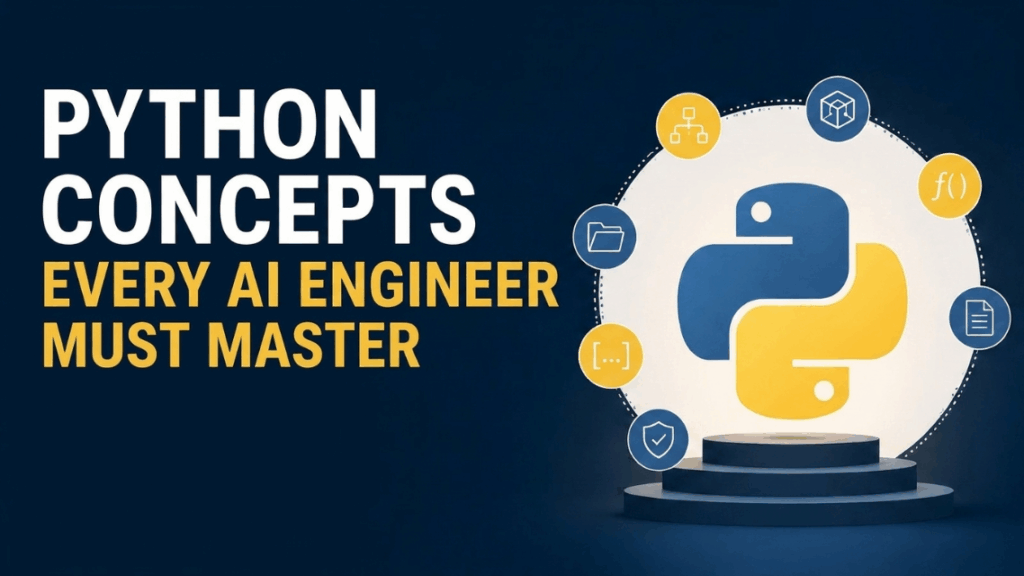
Transitioning from writing local experimental scripts to building scalable, production-grade AI systems requires a shift in how we write Python.
Python Concepts Every AI Engineer Must Master Leggi l'articolo »
We use cookies to improve your experience and performance on our website. You can learn more at Politica sulla privacy and manage your privacy settings by clicking Settings.


